In today’s digital age, an online presence is vital for any business or individual who wants to thrive in the online marketplace. However, more than simply having a website is required to ensure potential customers or clients find you. This is where the SEO process guide comes in.
SEO is optimizing your website and its content to increase the quantity and quality of traffic through organic search engine results. It involves strategically changing your website’s design, content, and code to ensure it ranks high in search engine results pages (SERPs) for relevant keywords.
While SEO is not a one-time fix and may take time to see results, implementing a long-term SEO strategy is crucial for long-term search success. In this blog post, we’ll walk you through a step-by-step SEO process that you can use to improve your website’s ranking in search engine results and increase your online visibility.
Importance of SEO for Long-Term Search Success
SEO is a crucial part of any long-term digital marketing strategy. Optimizing your website for search engines can improve your visibility, drive more traffic, increase brand awareness, and gain a competitive advantage in your industry. Here are the reasons why SEO is important for long-term search success:
Improved visibility: SEO increases the prominence of your website in search results, increasing the likelihood that consumers will look for the products, services, or information you have to offer.
Traffic Growth: SEO promotes traffic by increasing the visibility of your website. Leads, conversions, and revenue can all rise as a result of more visitors.
Cost-effective: SEO can be a cost-effective way to increase website traffic over time. Although there may be some upfront expenses associated with optimizing your website for search engines, these costs are generally lower than traditional online advertising.
Brand Awareness: SEO can help your brand become more familiar and recognizable. By ranking higher in search engine results, your brand is more visible to potential consumers, which builds credibility and trust.
Competitive Advantage: Investing in SEO can give your business a competitive advantage over others in your industry. By outranking your competitors in search results, you can get more customers and increase your sales.
The step-by-step SEO process guide is a comprehensive approach to achieving long-term search success. It involves six key steps that must be executed in sequence to achieve optimal results.
Step 1: Start by Auditing Your Website
Conducting a website audit is the first step in any SEO procedure. You can find any technical problems with your website that affect how well it ranks in search engines by conducting a website audit. Broken links, duplicate content, and slow page loads are examples of this. A tool like Google Search Console or an outside SEO tool can be used to audit a website. These tools will crawl your website and find any technical problems that need to be fixed.
Step 2: Look for a Keyword
Keyword research should be the first step in any SEO campaign. Finding out what search keywords and phrases your target market uses to locate your goods and services is essential. Optimize your content for these keywords to increase your visibility on search engine results pages (SERPs). You may research keywords using tools such as SEMrush or Google Keyword Planner. These tools can assist you in determining the terms and phrases your target market uses while searching for your product or service.
Step 3: Enhance Your Website
After deciding which keywords and phrases to target, the next step is to optimize your website for those searches. Title tags, Meta descriptions, and page names should all be optimized. Optimizing your website’s content for the keywords you wish to target is also important. This involves developing useful, high-quality content naturally and organically for your target keywords.
Step 4: Create High-Quality Backlinks
Backlinks play an essential role in search engine results. These links from other websites indicate to search engines that your information is of high quality and authoritative. To generate high-quality backlinks, contact other websites in your niche and request a link back to your site. You may also develop high-quality material that attracts links from other websites.
Step 5: Keep an eye on Your Traffic and Ranking
The next stage is to monitor your rankings and traffic after improving your website and creating high-quality backlinks. This will help you determine whether any elements of your SEO approach need to be changed. You can monitor your rankings and visitors with Google Analytics and Search Console. These tools will provide crucial details about your website’s performance in search engine results pages (SERPs).
Step 6: Evaluate and Revise Your Strategy
SEO is a continual process; analyzing and altering your approach regularly is vital. This will help you keep a competitive advantage and pursue your long-term goals. You can monitor your ranks and traffic using tools like Google Analytics and Search Console, which may be utilized to evaluate your strategy. You may also use third-party SEO tools to evaluate your website’s operation and identify improvement areas.
In conclusion, SEO is a long-term process that needs continual effort and dedication. Following these six steps, you may establish a complete SEO plan to help you achieve long-term search success. Remember to perform frequent website audits and keyword research, optimize your website and content, generate high-quality backlinks, track your rankings and traffic, and assess and change your plan. This may help you create your brand authority, build a strong online presence, and increase your bottom line in the long run.
However, keep in mind that SEO is continually evolving, and search engines are constantly changing their algorithms to offer consumers more relevant and helpful results. You must stay current on SEO best practices and developments to guarantee your plan stays effective and appropriate.
Do you need assistance developing a strategy to maximize your national brand’s reach? Making your products or services more visible and expanding your market presence is crucial. Therefore, you must employ a comprehensive national search engine optimization (SEO) plan.
National SEO is a comprehensive set of tactics to help a website appear higher in search engine results. It helps when people are looking for related products or services. Here is a comprehensive guide to National SEO to help you get started.
SEO services is an approach that multi-location businesses and larger enterprises. It is helpful to gain a competitive edge over their competitors by focusing on keyword terms rather than geographic areas. National SEO is a long-term strategy that can help them drive more organic traffic. Further, it helps increase visibility and increase rankings in search engine results.
National SEO: An Overview
National SEO involves optimizing content and other SEO techniques for a wider audience outside of a local area. It involves investing time, effort, and money to rank nationally for broader keywords. Instead, it does not limit the focus to local keywords. It is achieved by working with national SEO services to maximize a business’s reach.
National SEO requires a strong content strategy and a carefully crafted SEO plan. It helps to stand out from competitors and reap the rewards of increased national exposure. The focus is on optimizing your online presence across a wide area.
Further, it does not limit to just one specific location or no location at all. You can gain a competitive edge by utilizing the right keywords and techniques. Moreover, it also benefits from increased visibility on a national level.
National SEO campaigns typically target large audiences, often reaching millions. A more detailed and targeted approach is necessary to succeed in this area. Moreover, it focuses on a particular country or continent.
For each website page, measures and strategies should be considered long-term investments.
The goal is to create the best possible experience for users. National search engine optimization emphasizes the customer’s needs and can assist in targeting specific audiences online.
Important Aspects to Create National SEO Strategy:
Creating a comprehensive and effective SEO plan is essential to maximize the potential of your business. To ensure website accessibility, there are certain aspects to consider:
sufficient technological resolution
significant screen reader needs
screen reading modification
highlight vital components
Cancel and accept the continual data processing
screen reading mode
Prominent Objectives of National SEO:
National SEO is focused on optimizing a business’ online presence for broad keywords. It can help the business reach a larger audience and gain visibility in areas beyond its local region. The goal is to increase the business’s visibility on a national level. Therefore, it also helps improve its ranking on search engines for relevant keywords.
This type of optimization can take longer to achieve compared to local SEO. Yet the potential rewards from a successful national SEO campaign are significant. The main aim of any national marketing campaign is to increase the number of organic website visitors. A great way to measure the success of your national SEO efforts is to monitor the amount of organic traffic.
You can broaden your consumer base by increasing the number of web visitors. Also, it shows search engines such as Google and Yahoo that your website is valuable to users. As a consequence, your chances of achieving higher rankings are significantly increased. It’s also important to look at your audience’s size and your competition.
Significant Difference Between Local and National SEO
Local and national SEO services are two of the most popular business approaches. While both focus on optimizing a website’s visibility in search engine results, some key differences exist. Local SEO focuses on providing results tailored to a specific geographical location. In contrast, national SEO focuses more on exposure across various locations.
For example, local businesses would benefit more from local SEO than national SEO. It helps to target their local customers first. On the other hand, a national business serves better by national SEO. It is because they are trying to reach a much broader audience. Let us explore specific differences:
Target Consumer Base:
The primary distinction between national and local SEO is the target audience. For national SEO, companies must create a website that appeals to many people. At the same time, local SEO focuses more on a specific geographic region. One must eliminate the focus on a larger audience. Instead, businesses must focus on local SEO and have a website tailored to a particular geographic region.
Competition:
When a business focuses on national SEO, it usually faces much tougher competition. It is due to the sheer number of rivals they are up against. In comparison, a local SEO campaign may only have to contend with a handful of competitors. Moreover, a national search engine optimization strategy must compete with a much larger pool of contenders.
Keyword Analysis:
National SEO services optimize keywords and phrases related to a product or service. It does not include geographical qualifiers. On the other hand, Local SEO emphasizes optimizing for terms specifically tailored to a business’s local area. It helps to make them more searchable in that region.
Web Layout:
Businesses that focus on a national customer base typically have a website designed to attract as many people as possible. On the other hand, businesses specializing in local SEO create a website tailored to their local customer base.
Benefits of National SEO:
By working with a national SEO agency, you can expect a wider reach for your business. Also, more competitive keywords can lead to tremendous success. An effective content strategy will help you reach your goals and yield many rewards.
National SEO can offer a variety of advantages, including increased visibility and improved organic traffic. In addition, it includes better website rankings and more targeted leads. Ultimately, these benefits can lead to more significant business growth and a higher return on investment. Let us take a look:
National SEO Tactics Can Assist You In Gaining An Edge Over Local Rivals:
The most significant advantage of national SEO services is that it allows small businesses. It helps to compete with more prominent corporate brands. You might need help to match the more prominent companies’ resources for local marketing efforts. Thus, you can surpass them by utilizing national SEO tactics and gaining more visibility.
Growth In Business Sales:
By investing in a national SEO plan, you can expect to see an increase in website traffic. It should result in increased sales. With higher ranking on the search engine results pages (SERPs) will lead to more qualified leads and customers.
Conclusion:
Companies must prioritize online visibility to stay competitive in today’s tech-driven landscape. National businesses are investing heavily in SEO, making the market extremely competitive. By implementing a comprehensive national SEO strategy, businesses can expand their reach. It also helps to acquire their target customers, resulting in a worthwhile ROI.
Any expert SEO strategy aims to create a strong base for a website. It makes it look attractive and provides an easy-to-use User Experience. Further, it also ensures it prominently features in search engine results from pages. It is due to the brand’s trustworthiness and credibility. Building trust with customers and developing a good reputation takes effort, commitment, and providing a product or service of value.
You’re probably using a mobile to read this. Search elsewhere for the information you need if you don’t like how the website is organized, or the text is challenging to read. Consider how many people you may lose if your webpage is not mobile-friendly by putting yourself on the opposite side of the situation. So you need to hire a Mobile SEO company that offer mobile SEO services and help to optimize your website for various mobile device.
Your website should be “optimized” to appear fantastic on mobile devices. Additionally, it should load quickly and be simple to use. Finally, your website needs to appear beautiful on a full computer display as well as on the screen of a mobile device.
Although content wins over everything else, other essential factors also have a role, as we will see in a while. For example, the display device also influences the user experience.
What mobile-first architecture is and why it’s important will be discussed in this post.
The Importance of Mobile-First Architecture
Several mobile devices are owned by over 84% of people worldwide. However, the number of individuals that have access to computers and laptops is far more than that. In reality, many individuals use their cell phones as their only computer, limiting how they access the internet.
In any case, most individuals always have their cell phones with them. Moreover, mobile usage has significantly risen over the past few years. Over 54% of all online traffic originates from mobile devices, surpassing desktop usage.
Such figures imply that if your website isn’t mobile-friendly, you can lose out on a sizable audience. Your potential market (and consumers) are unlikely to deal with a bad user experience because there is so much material available.
Furthermore, due to Google’s “mobile-first” index, if your website is not mobile device-friendly, it could never appear on page 1 of the results from the search engines (SERPs or Search Engine Result Pages).
They will inevitably look around for what they need.
The Meaning of Responsive Web Design
A website with responsive design will fill the screen space appropriately and understandably provide content. This is possible on a mobile, tablet, computer, or even a wristwatch.
A website should automatically adjust to the scale of your screen as you view it. Components will be blown up to a certain amount for large displays, so they don’t appear enormous but still allow for simple interaction.
Mobile devices experience the same thing. You would like your site’s information to be downscale when using a lower resolution, but not to the point that it becomes illegible or difficult to interact with.
So What Do You Do Then?
In mobile SEO, creating a responsive design is the first significant step for making your website mobile-friendly. A responsive website appears correctly on devices of all sizes.
How to Design Your Website to Be Mobile-First
There are two approaches to making your website more user-friendly for mobile devices. Of course, every solution comes with trade-offs. The quickest method is installing a special mobile-first plugin, WPtouch, which will quickly give your webpage a responsive design.
It’s the most straightforward technique, but there are dangers because plugins might break or, in the worst circumstances, be hacked. So the most dependable and safe method is to add responsive solutions to your website’s code.
Additionally, you can opt for mobile SEO services from a professional agency and they will help you with the same.
A Responsive Website’s Hand-Coded Structure
If you decide to take issues into your own hands and turn your desktop website into a reactive, mobile-friendly website, you must include the following:
A viewing region
A flexible design
Responsive pictures
Media snooping
A word of advice: be careful while changing your website’s code, and tread with caution.
How to Make Images Responsive
Your website must be mobile-friendly, so your visitor doesn’t have to scroll up and down to see the material. Additionally, this is valid for all pictures, particularly infographics.
To match the dimensions of each visitor’s screen, responsive pictures should dynamically resize and enlarge. Consequently, it would be best if you utilized the max-width attribute.
Make the following changes in the CSS file or the stylesheet to make the images responsive:
img {
max-width: 100%;
}
Your photos will automatically resize to suit the available area if they are broader than the viewport you set in the previous step.
On a website – How to Change the Viewport
Viewing regions or viewports assist each browser in determining how to modify your webpage size to fit its screen. In addition, your websites will automatically resize to accommodate any mobile device if you include a viewport in the HTML of your website.
To do this, in the page’s <head> element, place the following line of HTML code to set the viewport:
Your website’s page components automatically adapt to any screen size when it has a responsive layout. So, for instance, if your table is fluid, it will adjust to the screen’s size. So, on a tiny mobile screen, you can view all the columns in this fashion without swiping left or right.
Following the specifics of your website, you might experiment with layout techniques like Grid, Flexbox, and Multicol.
Make Your Entire Website Mobile-friendly
Step one addressed the technological foundation needed to optimize your mobile device website. Good news, that was the most challenging portion. There are just only some more to go.
Your website will be mobile-friendly if it has a responsive design.
Now you should focus on the following:
Particularly catchy headlines and subheadings are recommended.
Your interactive components, including buttons and checkboxes, should be eye-catching in size.
Use wording that is big and simple to read.
Short paragraphs are preferable.
Make good use of the negative space.
Your website won’t appear crowded, thanks to it.
Give links and other interactive components some space.
Give links, as well as other interactive components, some space. Users won’t unintentionally push anything by mistake in this approach.
Avoid Popups That Block Your Content
Popups make it more difficult for your visitor to get the content they were looking for and increase your bounce rate or the number of individuals that leave your site as soon as they arrive. Currently, specific popups play a significant role.
Cookies are a need for most websites, and yours is probably no exception. Unfortunately, you can’t avoid using a popup because it has been obligatory to seek users’ permission before utilizing their data.
Users don’t come to your website to view popups, though. Users might not be as keen to think from your perspective if they are asked to approve the usage of cookies on the entire website. On the flip side, it will almost certainly irritate them, and they could even stop visiting your site altogether.
Popups that only take up a small amount of the screen are tolerated better by users. And it’s much better if they are simple to close and ignore.
Your website’s technical issues should be fixed
Even the slightest error—like the dreaded 404—will be simple to see on a tiny display. While a humorously designed 404 page may be helpful to you, an error is nonetheless a mistake and will detract from the user experience.
It is best to disregard them as a consideration.
Conclusion
Search engines saw the potential of mobile devices years ago and were absolutely correct. Undoubtedly, the internet is significantly better off due to the search engine giant’s significant investment in mobile friendliness.
Online material has evolved to be easier to read and utilize. But your website has to meet the industry standard. Across all of their devices, your consumers should have the same wonderful experience. To ensure that your site is up to par, use every option at your disposal if there is even the slightest possibility of doubt.
An SEO audit is an in-depth evaluation of the website. It mainly tries to analyze whether the website is following the best SEO practices or not. Most commonly, this is also the first step performed by a professional digital marketing agency if any business gets SEO services from them.
To maximize your SEO goals, an audit should be at the start of your SEO process, and then it should be performed from time to time. The audit checks what’s on the website and then you have to decide on what can be improved. It’s a continuous process as an SEO strategy relies heavily on it. This blog will serve as the perfect guide that’ll teach you how to perform an audit of a website.
Why An SEO Audit Is Required?
SEO or Search Engine Optimization allows businesses to market their products or services organically on the web. Being an unpaid internet marketing tactic, SEO is an umbrella term used for a host of digital marketing services. SEO includes content creation and distribution, Off-Page SEO, Technical SEO, and more.
An SEO audit is an overall process of checking your website and making sure that it abides by all the SEO practices. The audit is conducted at the beginning of the SEO process and then at regular intervals, or as and when required.
This audit also helps in checking if your website has any technical issues or not. Technical issues make it hard for Google to crawl and index your website. If that’s the case, your website can’t get ranked and you lose out on organic traffic.
Google has search engine bots, crawlers, or spiders that navigate the web in search of information. They go from links to links, and hence, from website to websites. This is known as crawling. In the crawling process, search engine bots discover pages that are available publically on the web.
Indexing is the process of storing the crawled web pages on the index servers. So, whenever, a user searches for a query, Google quickly scans through the indexed pages and presents the best results to the user.
With an SEO audit, you can understand if any of the pages on your website are having any indexing or crawling issues. If that’s the case, your pages don’t get crawled or indexed and your page never shows in the user search query. So, now you can see why conducting an audit is necessary.
Not just this, but an audit is also an opportunity to better your SEO tactics. Content, backlinks, or for that matter, any other information and technical parameter on the website gets checked and then optimized. Conducting an audit helps you recognize the problems on the website so that you can strategically improve upon them and your organic rankings improve over time.
The audit can be performed quarterly. You can also conduct an audit in a situation where you’re experiencing a drop in organic traffic and wish to understand why.
With that being said, you can now understand why conducting an SEO audit is crucial. You can build a whole strategy based on an audit and the future steps rely on it. A solid audit is the backbone of a well-formed SEO strategy.
What Are The Steps Involved In An Audit?
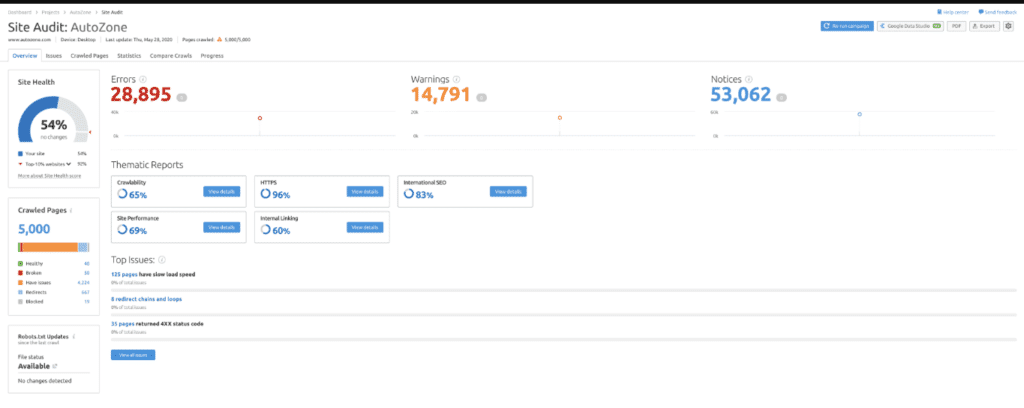
First off, you should run a website audit with the help of a tool. Tools such as SEMrush site audit tool, and Google Search Console can help you get started. Login into them, and start entering the basic information asked. Afterwards, some information regarding your website should appear on your screen.
Source – An example of a project on the SEMrush site audit tool
After getting this data, follow these tips that are mentioned below:
1. Check Your Rankings With Your Competitors
Whether it’s a new website, or you are conducting an SEO audit as part of an ongoing SEO strategy, you must understand the competition that you’re facing in your domain.
You should know the businesses in your niche you’re competing against. By using tools such as SEMrush, and Ahrefs you can undertake competitor analysis.
You can set your language, search engine, location, and device, and then add your keywords to start with competitor analysis.
Enter your keywords manually or straight from the tool that you’re using. You can even transport them from Google Analytics. Once you enter your keywords, you get a ranking of all the keywords in the tool.
Within these tools, you can right away enter the domains of your competitors and compare your keyword rankings with them. Your competitors are from your niche, and usually have a similar market hold as your business.
You can know about your competitors by conducting simple keyword searches on the search engine. As part of your SEO audit, see which businesses are ranking higher than your business on your target keywords. If you see a business appearing frequently on your target keywords and have similar market hold, reputation, trust, or credibility as your business, then that’s your competitor. You can also similarly check for local directories, social media metrics, press reports, advertising, or through your customers to know your competitors.
Doing such market research and understanding your competitors will give a solid base to your audit.
2. Scan Duplicate Versions Of Your Site
Google should always index one version of your website. It’s an essential check you must perform. Take this for an example:
https:// website .com
http://www. website .com
http:// website . com
https:// www. website .com
Look at the 4 examples for a minute. They may look similar but are rather different. When you do a Google search, only one version of your site should appear in all the results. A slight variation means trouble. The search engines perceive these as different variations of the website. Only one version of your website should be indexed and should appear in the results.
Simply go on Google and type site: your website name.com. Have a look at this example.
You can see on this example https://seoindiaonline.com/ appears in all the results. Any discrepancy in this during an SEO audit would have meant trouble. But that's not the case and there's no variation as it should be.
While you’re doing this check also keep a tab on the number of results. You see in the above example 173 results which is the expected number. If you see a large or a lesser digit than your expectation, there might be some issues that you need to look into. A lesser number indicates Google isn’t crawling or indexing your website pages properly which means you have a technical issue on your website.
A higher number means Google is indexing content you don’t want it to index. This also indicates that you have a lot of duplicate content or poorly written content that’s getting indexed. Either way, it calls for an indexing check which must be performed as quickly as possible as these results could be lowering your site rankings on your target keywords.
3. Abide By Google Webmaster Guidelines
Google’s Webmaster Quality Guidelines can issue a manual action against your website if you violate any of its stated guidelines. Breaking any of these guidelines can cause a sharp drop in your rankings. Your whole website can become non-indexed and won’t rank.
Google Search Console keeps you aware if you’ve violated any of these guidelines. Over to the left-hand side of the menu, you should see a ‘Security & Manual Actions’ tab. Within the tab, you must locate a manual actions link.
Click on the link and No Issues Detected should appear. If you do find any issues, kindly go through this official guide to resolve your issues. Therefore, with an SEO audit issues as such can be detected and resolved.
4. Analyze Site Speed
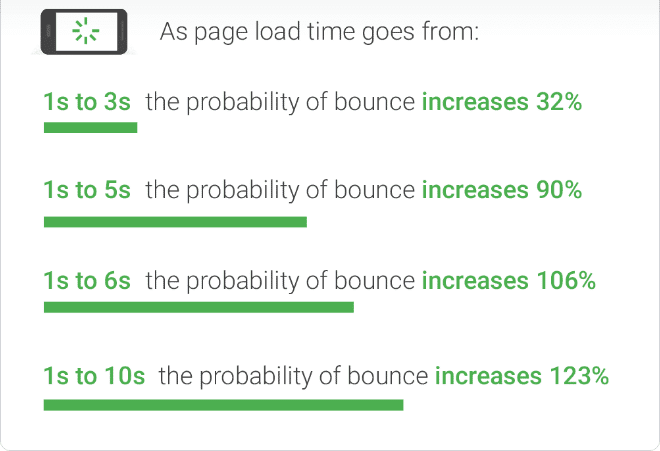
Your site speed is a crucial factor. No one likes a lazy, slow website. Individuals like those websites that are quick with an easy-to-use interface. If a person finds the website slow to respond, they’d leave, hence decreasing your leads, sales and revenue in no time. Your bounce rate shoots up and your business faces a major setback. Bounce rate defines the percentage of visitors that enter your website and leave without interacting with your website. A bad page speed can increase your bounce rate significantly.
As a matter of fact, Google rolled out a page experience update in 2021. So, you can see website responsiveness as a crucial ranking factor. Look at the below diagram to comprehend this concept furthermore:
Source – The picture shows how bounce rate increases with page load time
You can use tools such as SEMrush, Google Analytics, to discover and understand more about the page speed on your website. These tools also give you recommendations on how you can improve page speed.
5. Get Your Website SSL Certified
During an SEO audit make sure your website is SSL certified. You can check this by entering https://www.domain.com in the browser. If your site works on the HTTPS protocol, you’re in the clear with this. However, if you are redirected to an HTTP protocol, you’ve got some work to do.
SSL certification for a website has been a ranking factor since 2014. If your website still functions on HTTP, you need to add SSL certification. You can achieve this for free from Let’s Encrypt.
6. Use Google Search Console To Understand Various Indexing Issues
Access your Google Search Console and head over to the Coverage page in the Index section. Here you can get a complete tab on the issues, and errors your website may be facing. This can include coverage errors, excluded pages, or pages that have warnings.
You need to address issues if found and fix them immediately. Determine the cause and start working on these errors immediately.
Also, keep a note of your excluded pages. These pages are not yet indexed and can include:
Canonicalization issues
Pages that are indeed no index
404 or Not Found errors
Pages blocked by your robots.txt file
Redirecting pages
Go through the report and fix any major concerns, if necessary. You can learn more about these types of errors and issues here.
7. Check For Mobile Friendliness and Page Experience
Mobile-first updates have bought a major change in how Google ranks a website. Therefore, having a responsive design or a mobile-friendly website can boost your rankings in no time and should be a part of your SEO audit check. Mobile updates have been brought in by Google keeping in mind the increasing mobile usage. The better your website performs on mobile, the more it’s rewarded by Google.
2021’s Page Experience Update by Google clearly states how mobile-friendliness is an important ranking factor. Therefore, while doing an audit you have to measure the mobile-friendliness on your website.
Despite having mobile-optimized versions, or a responsive website design, websites can still experience mobile usability issues. In the Google Search Console, navigate to the Mobile Usability section in the Enhancements tab. If any issues are there, they’ll get displayed in this section. If not, you are in the clear and your site is indeed mobile-friendly and optimized for it.
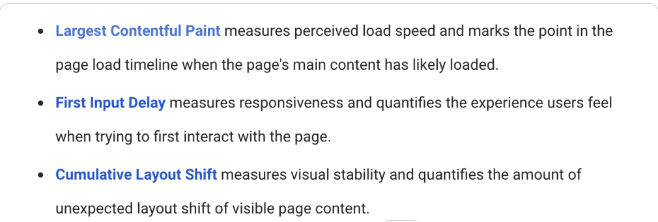
Also, keep in mind that Google now takes into consideration the page experience alongside the core web vitals.
Google’s core web vitals measure the user experience through various parameters. For example, have a look at this image:
Source – The parameters used to measure the core web vitals
Core web vitals are a crucial rankings factor and your SEO audit, should hence, include these parameters. You can measure these parameters in the Google Search Console itself in the ‘Enhancements’ tab. This way you can look at poor URLs on both mobile and desktop and can improve upon them, if necessary.
8. Optimize For On-Page SEO
On-page SEO parameters should also be part of your audit. During On-Page SEO, you must check the following things:
Image alt tags
Creating and making sure content is SEO optimized.
Optimizing title tags, meta descriptions, and heading tags.
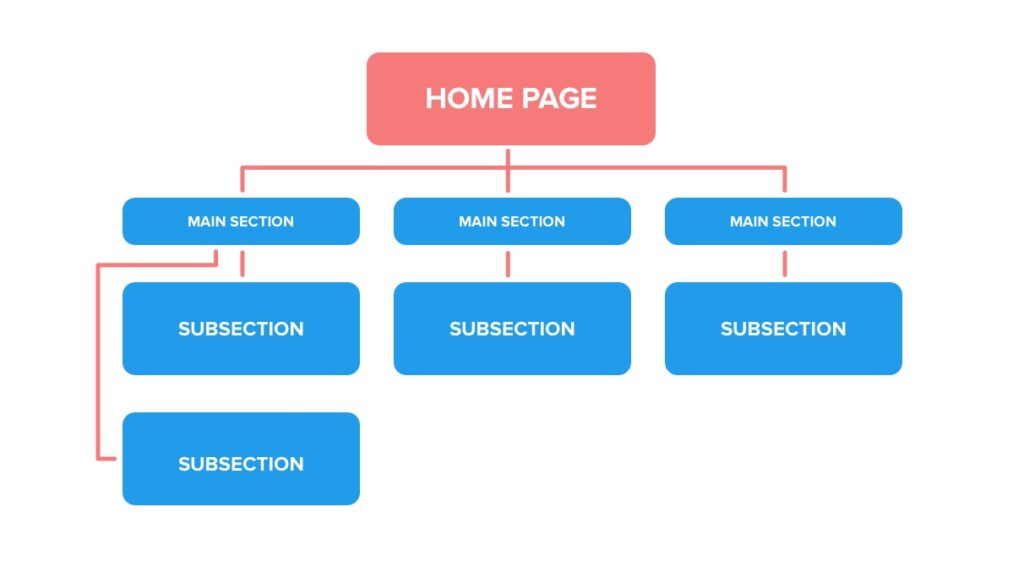
Internal website linking
On-Page SEO refers to the SEO optimization that you’ll make on the pages of your website. Ahrefs, Screaming Frog, Moz, and SEMrush are all great tools that can help you optimize your on-page elements. These tools can even provide you with ideas on how to optimize your On-page elements alongside indicating the issues.
9. Quick Link Fixes
Not all SEO audit components are time-consuming. There are some simple, effective techniques that you can undertake quickly. These measures include:
Fixing Broken Internal Links
Having broken links on your website can give a poor user experience alongside displaying error 404. Not just this, but even search engines receive poor signals from your website if you have way too many broken internal links.
Simply removing or updating the wrong URL should resolve your problem. Tools such as Google Search Console, SEMrush can help you find broken internal links and help resolve them.
Repair Your Sitemap
A site’s XML sitemap specifies the pages that Google is allowed to index. With a sitemap, Google or any other search engine can find information about the content on your website and the relationship between them. With the help of tools, you can generate a sitemap for your website. Go through this link to automatically generate a sitemap for your website. You can even let your CMS like WordPress generate a basic sitemap for you. Mind you, with this method you’re more than likely to use a plugin. Therefore, creating and fixing your sitemap should be part of an SEO audit.
After creating the sitemap, you must submit your sitemap to Google. You can submit your sitemap by taking the following steps:
Go to Google Search Console and select your website.
Click on the Sitemap from the left bar.
Add your sitemap URL and click on submit.
If your sitemap does have any errors, you should quickly remove the incorrect pages. If your sitemap file contains a URL with the same content web pages, or are redirecting to a different page, or more, then these are not good signs. You should immediately start fixing your sitemap issues by editing your sitemap file.
Have A Look At Your Redirects
You’re having redirects? That’s good but are they doing the job intended? It’s good to check your redirects are doing as expected. Improper redirects can lead to redirect chains and loops. SEO tools can help you figure out your redirects and solve any issues if required. Also, keep in mind to always have 301 temporary redirects instead of 302 permanent redirects, unless you want it to be permanent.
10. Content Audit
Content is king and there’s no denying the fact. However, along with your content, you must check the links included in it. You need to understand not all links are good links. Your links should be from reliable sources, and anything spammy should instantly be removed.
You can again make use of SEO tools such as Ahrefs, and SEMrush, to figure out the bad links and remove them.
Checking for duplicate content should be a part of your SEO audit. Make sure to remove any duplicate content. Always keep the content fresh on your website, and duplicate copies should not exist. Similarly, also remove or improve your thin content. Thin content is content that’s of no value to the user. Your website might contain sections of content, blog, or articles, that don’t add any value to the user. You should either remove this content or improve this content to make it valuable. You can also make them no index so that Google search bots can’t access them.
You should also focus on content that has no internal linking. Your website pages should have at least one internal link. Pages that have no links or internal linking can bring your website rankings down. Get at least one quality, appropriate link to make the page more useful to the reader.
Lastly, write content that solves user intent. Any content that solves user queries is valued by Google. Your website content should provide value to the user. If you’re not ranking well, go through the content of the pages that are ranking at the top of your target keyword. You’ll have your answer.
Conclusion
An SEO audit can help you formulate an effective SEO strategy. In fact, this is usually the first step of an SEO strategy and this guides the further steps that you must take to improve your SEO rankings. You can even optimize an ongoing SEO plan with an effective audit.
Take your audit steps in the order of severity of the problem and you shall see some positive results. Take into consideration the resources and the time needed to fix these issues. If these variables are handled well, your audit and resolution should do wonders for your SEO plan. Whether it’s your first step or part of a continuous SEO plan, you should see some positive results with an SEO audit if done properly.
A novel chatbot driven by AI can revolutionize search engine optimization. Below are some examples of its current applications. Be careful, Google. The new player has entered the field of search engines.
It may converse with people in a cognitive fashion utilizing artificial intelligence (AI) and databases, responding to follow-up inquiries, admitting errors, declining unsuitable inquiries, and even refuting faulty assumptions.
While not specifically a Google competition, this OpenAI chatbot transforms how it conducts research. For example, it will fundamentally change how it handles search engine optimization. In this article, we’ll examine these technologies and discuss some cutting-edge applications forward that search engine optimizers use to accomplish their tasks.
What Can You Do With ChatGPT?
The potential of machine learning and artificial intelligence in SEO and advertising is still exploring. ChatGPT can join in conversations and respond to inquiries in a way that resembles a human.
It can produce novels, poetry, essays, and even advertisements, sufficient to worry experienced writers like myself. The New York City Department of Education has already prohibited its use due to concerns about cheating because it can create precise and adequate information.
ChatGPT is intelligent enough to be utilized for writing meta descriptions and debugging codes in addition to contents. It is currently a laborious technical process for scripting, but it appears plausible to expect that it will become significantly more straightforward as the learning model expands.
It can also serve as a search helper, offering responses to inquiries in a simple and understandable format, saving users the need to browse through numerous website pages to locate the data they need.
However, it would be wise to embrace AI technology instead of being concerned about it. There are different ways you can utilize it to organize your workflow and increase the effectiveness of monotonous or repetitive jobs.
Let’s examine how modern SEO experts or SEO Companies are already utilizing ChatGPT.
Methods That SEO Pros Are Previously Pushing ChatGPT To Work
Generating Content
If you don’t have a talented (and modest) writer like myself on the team, producing material might be a nuisance. Does ChatGPT carry this out for oneself? It still can, but you must avoid employing it to compose blog entries and websites.
John Mueller, the Google Search Advocate, stated unequivocally in 2022 that the search tool considers artificially intelligent information spamming a breach of the company’s standards. Even information that uses anti-detection techniques can currently be penalized by Google algorithms. When using AI, human monitoring should always use.
To securely write Content for posts to social media, email presentations, PPC webpage copy, and even advertisements, anyone can utilize ChatGPT. Also, it works well as a creative technique.
However, you should always carefully examine any dynamic content because it might contain errors. ChatGPT can assist in simplifying numerous duplicated content jobs, such as advertising versions if you use caution.
Keyword Assessment And Research
Okay, so you don’t want to run the danger of being prosecuted for using ChatGPT for content creation. However, that doesn’t indicate the quality content can’t take advantage of its strength.
Researching keywords is relatively trivial using ChatGPT. Launch the chatbots, enter a couple of your desired keywords, and request related things. ChatGPT will list relevant terms depending on its knowledge of the search results.
I conducted keyword research for a bank software company to test such a feature. Soon after, the chatbot gave me a shortlist of phrases and words that would have required me considerably longer to keep coming up with using more conventional targeted keyword methods.
It is accurate. ChatGPT should create an overview of your information marketing plan. Although you could ask for them, it doesn’t provide detailed strategies but offers high-level strategies for information about a particular discipline.
One caution regarding using a chatbot-created content marketing strategy is the worry that your direct rivals might follow suit. As a result, you’re all writing blog content equivalent to “the advantages of AI,” “how AI SaaS may increase productivity,” etc.
Improved Perception Of Research Focused
This capacity of ChatGPT to delve deeper into the search engine and see beyond the keywords to the search queries is the most intriguing SEO-related possibility.
Indeed, Google strives to accomplish it, and yes, it has improved significantly throughout the search engine’s existence, but rather to paraphrase Keiran Flanagan in a post, “Google takes your question and attempts to respond to it. The inquiry by ChatGPT frequently improves it.
Even though the beta version of this chatbot is still not online, learning capacity will enable it to gain much higher knowledge. It is of every search’s objective and occasionally even provides results the user wasn’t even aware they were searching for.
As an SEO expert, you know that your ranks will soar by modifying your data to address a query more effectively. One could achieve that with ChatGPT.
Producing Excellent SEO Labels
Any copywriter will tell you that headers are among the hardest to write, especially for SEO purposes. It frequently becomes dry topics such as “How To Generate Backlinks” or another uninteresting comparison.
I requested ChatGPT to provide me with a selection of headlines for a webpage on backlinking to change things up, and it gave me ten alternatives, which were all better intriguing than the original “how to” lines.
Composition And Management Of Analytical Statements
Spreadsheets and reporting are the hellions of several marketers’ working existence. Businesses, however, demand information to show the impact of their work. It is where ChatGPT can transform the game. Additionally, you can find fresh ranking prospects you would have overlooked using this capability.
Imagine you have little programming skills but must create regular expressions for analytical reports. For instance, you could use specific keywords to filter reports to find more room for FAQs or even how. Anyone understanding these statements can utilize ChatGPT to interact with the chatbots to assemble a list dynamically.
Similarly, ChatGPT can help you with Google sheets or Excel if you frequently deal with them (and who’s not?). But, again, this can take a lot of the stress of developing equations and analyzing information.
AI Offers A Bold Modern World For SEO
A very remarkable application is ChatGPT. Specifically for SEO services, it’s simple just to get overtaken in the thrill of everything it delivers and what it may be able to do.
It may save you thousands of hours a year with the little sample of features mentioned here.
Even yet, there are some disadvantages. For starters, in its modern iteration, it can only use information up to the year 2021. Therefore, it cannot offer any insight into current developments.
Although it’s safe to presume that a future iteration of the chatbots will address this problem, we are still unsure how quickly the AI can pick up on new occurrences and connect them to specific other issues.
Furthermore, it is not entirely truthful and objective. Its sources can cause it to accept and repeat incorrect data, and the initial dataset it was training on could be bias-free.Last but not least, as a person who grew up seeing Terminator films, there is constantly the concern that ChatGPT may develop consciousness and enslave humans. So, I went right up to it to be cautious.
The Final Verdict
ChatGPT is excellent, and all indications are that it will continue to improve. It demonstrates the ability for the optimization of search engines to become significantly faster and more effective. We should take all precautionary measures to prevent it from being linked to the nuclear arsenal.
Every page that you access through your browser has a response code. This code is the number such as 200, 301, 302 which tells you whether your request was satisfied or not. Another response code that you may encounter is 404. This means that the webpage could not be found.
While this might sound like a minor irritation, imagine yourself in this situation: You are looking for something specific on the web and every link leads to a broken page because it has a 404 status. Obviously, getting frustrated would be an understatement of what you will feel after spending hours trying to find what you are looking for only to end up with lots of “page cannot be found” messages.
To put it simply, any code that comes between 400 to 499 shows that the page didn’t load properly. In addition, the 404 code reflects that the page is being deleted, shifted, and not coming back anytime soon. On the other hand, a 301 code tells you that the page was moved to a new location. This is something very useful if you want to avoid broken pages in the future because it saves all of the relevant information from one location and takes it to another.
What is a 404 error?
A 404 is the response that your browser sends when it cannot find a web page or resource. The “404 Not Found” error message is displayed when the webpage you are trying to reach can’t be found on the server, meaning that either the page was deleted, never existed before in the first place, has moved to another location or something went wrong while displaying it.
This means that if you have made several links between two pages and one of them happens to link to an invalid URL, all of them will not work anymore. This problem becomes significant with dynamic sites because they change their location frequently. If this occurs in static websites though, things are much more simple since they don’t move very often.
Many browsers try to give you an idea of what went wrong with a web page by showing a “Did you mean?” message under the 404 error code. This way, if you have misspelled the URL you can still get where you wanted to go, but this depends also on your server settings.
How to fix 404 errors?
The first recommendation is to make sure that your web server doesn’t show “404 Not Found” but instead returns a custom page with information aimed at your users, apologizing for the inconvenience. This way you will avoid broken links and because of that, think positively about search engine crawling too.
This may be achieved if you are using dynamic content which changes constantly or if your web pages are stored in several servers. If this isn’t the case though then there are many other ways to solve the problem: Fortunately, it is possible no matter how complex your website structure is.
The first step would be to install Apache Traffic Server so you can monitor all of the incoming requests from your users and check if any of them point to a 404 page. If that is the case then you can redirect these requests by sending them to another valid URL. This can be done automatically only on the basis of the domain name or it can be implemented as a custom script that finds out what was requested and finds an alternative for it.
Another option is to install a plugin, such as Redirection, which does exactly that: finds pages with a different status code and changes their URL accordingly so they remain functional even though they returned an error code. Even though this method creates many duplicate URLs, also called soft duplicates, these aren’t something bad since search engines understand how dynamic content works and treat those URLs as separate listings instead of just one.
Finally, it is also possible to use custom 404 pages created with one of the many WordPress 404 plugins. This option has both pros and cons: on one hand, you fix the problem once and for all by having a single plugin but on the other hand, you need to assign an administrator user rights to access that page and don’t have as much control over how it works.
Now that you know what causes 404 errors and how to avoid them, think about why they actually happen and decide which way of fixing them will best suit your needs. Don’t forget that not only do search engines dislike broken links, so do your audience! If people can’t find what they are looking for after clicking a link from your website then they won’t come back again.
Soft 404s are pages that return a valid HTTP response code, but not one in the 200 range – i.e., they return an answer other than HTML which matches what browsers expect from a web page. Soft 404s cause problems because while they do serve content to users and don’t look like broken pages, search engines see these as non-existent pages and don’t include them in their indexing process, which hurts crawl rate and the site’s indexing process.
How to fix soft 404s?
One way to ensure that your website doesn’t return a soft 404 is to configure your web server. So it serves as a custom page with some information about what happened and how users can navigate the website. While this method causes additional traffic, as search engines may see these custom pages as duplicates of each other, or even worse, as attempts at cloaking content from them, they are better for user experience and will encourage visitors to come back.
The other option is to not have a file with the same name as the non-existent URL but instead use paths that do lead somewhere. This way you avoid any confusion on behalf of both visitors and search engines because there is no chance for them to think that you wanted one page or another. For the time being though it’s probably best to stick with using custom pages, as these allow for more control over what you display.
Most web designers are aware of how important it is to make websites compatible across different browsers but they tend to forget about honoring the conventions set by search engines – having all links point to existing pages that are also available in HTML format, for example. If this isn’t done then search engines may not be able to crawl your website at full speed or won’t even crawl it at all – which leads to lower rankings and worse user experience.
Google deals with 404 errors & soft 404 errors the same way, by not including the non-existent page in its index. Google has programs to find 404 pages and help webmasters fix them, but they won’t affect rankings.
It is possible for WordPress users to fix soft 404 errors through plugins. Custom 404 pages are also possible via plugin or custom coding.
By fixing soft 404 errors, you can avoid losing traffic & rankings because of search engine crawlers ‘not finding’ something on your site that doesn’t exist. It’s best to fix soft 404 errors with custom pages rather than redirecting links because search engines might see this as providing duplicate content which could hurt your site’s ranking or even get it penalized.
There are several disadvantages of 404 pages. Firstly, they can cause problems for users who are already looking for what you offer. For example, if the user has visited the 404 page from a search engine listing then it is likely that they have bookmarked your website in order to return at a later date. Now if your website gives them a 404 error then they will be extremely annoyed because not only have they lost their bookmark but since you didn’t give them any other information on how to get hold of the content that they were looking for, there is nothing else that they can do to find it.
Secondly, when someone gets a 404 page instead of the content that was originally promised; many users won’t take this well and decide never to visit your site again. Even worse, some people may assume that this means your website is no longer up and running – which can be harmful to your reputation.
Soft 404s are a special class of HTTP response code which means “I don’t have anything for you”. Soft 404 responses occur when a webpage does not exist on your server but the client was able to establish a connection and is expecting some kind of response back (it will either receive it or get an error). If this happens, chances are that they expected something specific; instead, they received an empty page with no content on it.
2: Keep auditing your site
For avoiding problems of 404 and soft 404 errors, ensure you perform a regular technical audit of your website. You can visit your site with various tools that are available on the web.
Prominent search engine optimization firm, SEOmoz provides excellent Search Engine Optimization (SEO) software, known as Moz Link Explorer, to check for broken links and more importantly – the return of HTTP code 404 or status code. You can also run it on your backlink profile to find broken backlinks pointing to your web pages.
You can also check a website for 404 errors and other problems by using the Xenu Link Sleuth, which is free to use.
In order to ensure that your WordPress site does not give out any HTTP/404 errors or soft 404 errors then you should always have a valid backup of both the database and files. In addition, it’s important to test frequently – making changes to your WordPress site manually without testing them thoroughly beforehand could lead to major problems occurring on the live version of your site.
The easiest way would be to create a staging environment where you can experiment without affecting how things are currently doing on your website. This way you’ll avoid any potential losses in rankings and traffic.’ “title”: “404 vs. Soft 404 Errors:
3: Fix the thin content issue
You can eliminate the soft 404 errors by fixing the pages that have thin content. You can do this by:
Adding more and relevant content to the pages so that the chance of them not getting indexed is reduced. Adding necessary links on these pages to pages that are already working. Ensure that there’s a good user experience throughout your site, especially for 404 errors.
If you don’t need certain pages then it’d be best to get rid of them rather than leaving them there until they start causing problems with rankings or traffic. If you’re using WordPress as your CMS then deleting a post automatically redirects it to another page, which is good because it helps you avoid losing traffic due to soft errors.’ “description”:
If some of the website pages have duplicate content, consider fixing it on priority. You can fix duplicate content by either making the necessary changes to each version of the page or consolidating all these pages into one. You can use Google Webmaster Tools to find out which version of a particular webpage has more indexed content.
You should remember that for each of the pages, you’ll only be able to make use of them at most once per search query. Having too many irrelevant or duplicate pages with thin content is not good for your site’s rankings and thus it would make sense to consolidate all similar web pages into one page.
4: Fixing broken links improves SEO
When you fix 404s and soft 404s, the overall SEO performance of your website improves. When you fix broken links, visitors can easily find what they were searching for without any hassle.
When you fix 404 errors, Google crawlers see that the website is more responsive. Even if it’s not related to your top keywords, Google crawl may start visiting your site frequently after fixing all 404s.
When you are done fixing soft and hard 404 errors, go through every page of your website to make sure there are no more errors or warnings in 404 pages reported by Google Search Console (formerly known as Web Tools).
You can also check a website for 404 errors and other problems by using the Xenu Link Sleuth, which is free to use.
There are several advantages of fixing soft 404 errors. Firstly, it is easy to fix soft 404s compared to hard 404 errors. Secondly, search engines take into consideration your effort in correcting mistakes and reward you with good rankings for your efforts leading to high traffic from organic sources. Thirdly, users will be able to find what they search for on your site which means higher conversion rates.
Fixing soft 404 errors is an easy process that can be done by anyone. You just have to filter through the search results to manually find out where the soft 404 errors are. Then you need to change your internal linking structure so that URLs with 404 errors do not appear in search results anymore.
5: Using Screaming Frog tool
Screaming Frog is a useful SEO tool that helps you find pages with thin content. It crawls pages, extracts all the necessary information from a website, and allows you to filter through the data so that you can find errors easily.
In this tool, you can select the near duplicate option and then start the scanning of your website. You can scan for these pages and import all of them in an excel file. You can then use the list to find out the pages that have thin content.
You also need to check your website’s code so that all links are in place and you don’t have broken links. You should be looking for any instance of a 404 or 410 page being used as a response page, in your HTTP headers or anywhere else on your site (unless you deliberately choose to show these errors). The link structure of every website is complex because the number of pages usually exceeds.
Along with this, also ensure there is no technical issue with the website. After fixing 404 errors make sure there are no more outgoing links to pages that do not exist.
Ensure the Google bot is able to crawl and index the pages that you’ve fixed. If you have a WordPress site then the Yoast SEO plugin can help. It shows you all the incoming and outgoing links on your website and also warns if there is any broken link.
Wrapping up!
Both 404 and soft 404-page errors are harmful to your website’s SEO and overall user experience. Thus, always ensure there are no such errors and you’ve fixed them for better website indexability. If you don’t have an in-house technical SEO team, then it’s better to hire professionals and let them fix 404 and soft 404 errors. As search engines focus more on the overall user experience, it’s better to fix these errors and ensure an interactive user experience.
Keywords are the base for effective SEO and driving more sales & revenue. Regardless of which industry you are working in, effective research is important to rank better. No matter if you are starting out, or already doing SEO, keyword research & analysis for SEO is a constant process. If you are new to SEO and want to know everything about this practice, then we have got you covered. In this guide, we will see how to do keyword research for AI SEO services and how it would be beneficial.
Keywords are the words that people type in when they search for a product or service online. These words are typically a subset of a larger group of queries or search phrases that users enter into a search engine each day. Moz suggests there is no ‘right’ number per industry but around 500-800 monthly searches per month are considered as less competitive keywords while 10,000+ monthly searches per month are considered high volume/competitive keywords.
This does not mean that smaller keywords can’t bring you traffic or revenue, but rather if you want to rank better in the top 3 positions on Google then you have to optimize your content using more specific
Why is Keyword Research Important in SEO?
Keyword research is the first step in the SEO process – without strong keyword research & analysis, you cannot have a wonderful strategy. If you are going to build an SEO strategy based on keywords, then they should form the foundation of your approach.
“But there is no guarantee that people actually search for those terms.”
It’s true – but if your competition is ranking for those terms, it means that the topic has commercial intent and other websites are putting out useful information about it. And if that’s not enough evidence for you, look at Google’s own Keyword Planner data: when people search for these topics today, thousands of them use each term as part of their search query (i.e., they’re looking “for” those terms).
Right keyword research helps in improving the sales of your company. If you are able to choose the best keyword for your business, then it brings more traffic and high conversions for your business.
When trying to figure out which keywords to focus on, it may help to start by looking at what keywords your competitors are targeting – this data is available in Ahrefs, SEMrush, SpyFu, etc. This allows you to see how many people are searching for a particular term, which countries/regions those searches come from, related long-tail keywords as well as seeing which sites ranking above you currently rank for each of these keywords (there’s no point optimizing content if there’s another site that already ranks better than yours).
This also helps with knowing where your customers or prospects might be coming from. If you are selling a product that is popular in the UK, then it might make more sense to optimize for keywords that people search for in the UK (especially if your traffic is coming from countries like India).
When doing keyword research it’s important to not get distracted by all of the related keywords or long-tail keywords people may type into Google while looking for something else. Focus on picking keywords where you know searchers are actually looking for something that you can provide them with (don’t try and rank #1 for “socks” when there’s already 5 sock e-commerce sites up there) – this also allows you to conduct competitor analysis using tools like SEMrush.
You need to first search for what topics your audience is interested in. You can search on Google using the following keywords:
Product name + word “review”
Domain/Keyword + word “review”
Site:Yourdomain.com keyword
Once you have found some ideas, look at their organic rankings and see what sites rank for these keywords. You can do this by searching for a domain and adding “organic keywords” in the search query box and it will give you all of the keywords that the site ranks for. This information is useful because if a site has specific content ranking well in the top 10 for SEO-related terms, then there’s a good chance your specific SEO guide topic may also be profitable or worth targeting.
Brainstorming the topics helps in getting the keywords that the audience is searching for. You can either use Google’s suggested search or you can brainstorm keywords on a whiteboard and then find the ones that are being searched.
If you have already identified your product categories, then it helps in knowing which type of content will be most helpful for your customers (blog posts, videos, podcasts, etc.). If you are targeting broad terms like “review site”, then look at what specific brands or topics people may be looking for (i.e., “Nike sports shoe review” or “Adidas new shoes review”) – this information will allow you to create more targeted content with less effort (and get better results with any SEO efforts).
Perform a quick competition website analysis to see what are the keywords on which their website is ranking. You can do it using a few tools like SEMrush, SpyFu, or even Ahrefs.
However, you should not only look at the top 10 results as there may be other sites that are ranking for keywords but aren’t in the top 10. For example, if someone is trying to search for sports shoes and your site ranks #2 for that term then you have a chance to increase your organic traffic by focusing on that specific keyword as well as similar related keywords.
There are many keywords research tools available online. Among them, there are both free and paid tools available.
Google’s keyword planner
Keyword Tool – Provides Google traffic estimates for keywords. It is useful to estimate the keywords’ volume on different search engines like Google, Bing, etc. The tool also provides monthly cost-per-click (CPC) data which shows you how much advertisers pay for that keyword.
SEMrush
SEMrush is a very comprehensive tool that provides search volume on various search engines as well as competitor/keyword analysis. With SEMrush, you can get organic search data from Google Analytics with just one click. You can also use competitors’ SEO performance reports by entering their website URL in the SEMrush site audit tool section.
Ahrefs
It is a Keyword Explorer tool that helps you find the best keywords for your website to rank higher. Ahrefs also shows you all of your competitor’s backlinks, keyword rankings, and site audit reports.
Wordtracker
This is an old and reliable keyword research tool that has been in use for more than 20 years. WordTracker offers a suite of services including competitor analysis, content optimization, long-tail keyword discovery, etc.
Google Trends
The Google Trends section provides data on trending topics over a period of time. It can help in identifying up-and-coming trends that may become popular in the future as well as what people are talking about at present. You can further analyze those trends using Google Trends’ related terms feature shown below:
For example, Apple Watch has been searched more often than Apple TV thus giving it an upper hand over its competitors as well as helping the marketers understand who their audience is and what they care about.
Keyword Surfer
Keyword Surfer is also a good keyword research tool that helps you generate keywords that are closely related to your original seed keyword. There are many benefits of performing accurate and effective keyword research, including:
Keyword research helps in understanding what people are searching for. This information can be used to identify the best topics/products you should target, the resources needed to create blog posts, videos, or podcasts about those topics, etc. Keyword research also provides valuable insight into what competitors are doing. You can find out how their sites rank for different terms (which will help you know which terms they’re targeting), who links to them (which can be useful if you want others to link.
Keyword Difficulty
It shows how complex it is to rank for a particular keyword. It takes into consideration the competition and the demand of that niche. A low keyword difficulty score will help you rank easily for keywords with a high volume of traffic, whereas a high keyword difficulty score will indicate that it is hard to rank even for medium-to-high competition terms.
It shows websites ranking at number 1 have around 59030 monthly searches whereas those ranking at number 10 have around 4700 monthly searches (which means you should not choose keywords with less than 5000 monthly searches if your website doesn’t target long-tail keywords). Sites Ranking between #2 and #5 also contain more than 2000 monthly searches while sites ranking between #6 and #10 also have less than 2000 monthly searches.
Long-tail keywords have less competition which means you can optimize your website better and rank faster for them. They also get more traffic than short-tail keywords which means you’ll get a share of the pie if you optimize your website for such terms/keywords.
The best length of long-tailed keywords is around 5 to 6 words (also called high search volume, high intent keywords) and it is extremely hard to rank for such highly competitive short-tailed keywords (2 or 3-word search phrases).
Search volume: Knowing how many people are actually searching online for a particular keyword will help you prioritize topics and plan content accordingly. You can create/share content around top-performing keywords when they’re trending up in order to generate quick organic traffic hits. That way, not only will you get targeted traffic but your content will also be shared widely.
Ability to discover new topics: You can use keyword research tools to identify new keywords that are not being used by any of your competitors. Creating unique, interesting content around those underused terms/keywords can help you shine in SERPs as well as boost organic traffic for your website.
How to choose a keyword
Now you’ve got a list of keywords but which keywords are the best for your website. There are various factors to consider when choosing the best keywords for your website/blog:
Type of content you already have How much competition there is for a particular term Related topics Competitor’s ranking history Traffic potential The difficulty of a keyword
You should use all these factors to prioritize which terms to target. For example, you should write blog posts about high-traffic keywords that also have low or medium competition levels. You can then use those articles to drive traffic through social media and other online avenues. How Search Engines work
How do search engines actually work?
Search engines crawl websites in order to identify their content. Once they’ve crawled a page, they’ll identify several key elements on the page including meta title/title tag, meta description, H1 tags, alt tags, content, etc. search engines use these elements to identify the topic/theme of that particular page and then rank it accordingly in SERPs (search engine results pages).
Search engines also try to determine what type of website they’re crawling. For example, if Google crawls your blog which contains posts with long-form content shared on various social media platforms (Facebook, Twitter, LinkedIn), it will assume you are an authority site in your niche and probably give you top rankings for all related keywords.
Google’s algorithmic search works on a number of factors including how many trust signals (i.e., backlinks) the website has as well as how relevant each listed page is to each keyword.
You also need to consider higher search volume keywords that have less competition because you’ll be able to rank your website for those keywords quickly. If you want to target lower search volume keywords with medium/high levels of competition, you should write articles based on long-form content which helps search engines determine your site as an authority site in its own right. Go for keywords that have a lower difficulty and a higher search volume
Type of content you already have
This is usually the first thing people look at when choosing keywords because it will help them determine how easy or difficult it’s going to be to rank for a particular term/phrase. The type of topic/content you’ve chosen for your website has an impact on key elements like meta title, meta description, H1 tags, etc. For example, if you want to target car-related terms then it makes sense for you to create long-form content that talks about cars in detail (technical aspects, their history in the US). That way, Google will identify your website as an authority site when it comes to cars and push the relevant pages up in SERPs (search engine rankings).
Google Search Console
Google Search Console is a good tool for performing keywords research. It tells you how many people are searching for particular phrases/keywords, the average position of your website in SERPs (search engine results pages), and other useful information. However, the data provided by Google Search Console is usually monthly which can be misleading at times because ranking fluctuations happen on a daily basis. Also, it only provides data based on English searches alone while there’s a huge market out there that doesn’t operate in English.
That said, Google Search Console does give you an overall idea about what type of terms are high or low competition for your website. You should start with low/medium competition keywords before working your way up to high-competition ones.
Click on the Performance Report option of Google Search Console to check on which keywords your site is ranking. This report tells you the terms that bring in the most clicks from Google search. It also tells you how many clicks came from Google organic search and which keywords have the highest click-through rate (CTR).
You can sort the keywords in Google Search Console with their total number of impressions. This tells you how often these keywords appeared on Google. If the impressions and clicks on the keywords are higher, you can pick those keywords. Also, you should sort the keywords in Google Search Console with their average rank. You can create a competition score for all these keywords and choose those which have a lower difficulty factor.
Wrapping up
Keywords research is the most important aspect of search engine optimization that helps you gain a competitive edge. Follow the above tips and tricks to perform result-driven keywords research and gain a competitive edge in your industry. Even if you are doing SEO for a while, as the search algorithm changes, your keywords research strategy should also see a change. So, do your research and then use the keywords on your website. It’s among the most time-consuming aspects of SEO but it brings the best results to your website. Get started with keywords research now and drive more traffic and sales to your website. If you don’t have an in-house SEO team, you can also hire one to gain a competitive edge.
News websites are not in the same lane as regular websites. With a regular stream of fresh content, news websites have various advantages when it comes to bringing the traffic. However, there are certainly unique methods to implement SEO when it comes to news websites, including Hindi news sites.
Just putting out the latest news on the website doesn’t ensure visibility and traffic. News websites have their way of bringing traffic and to get a leg up in the competition, this blog covers all that you need to know.
What Is Hindi News Websites SEO?
News websites exist on Google in multiple languages. Hindi news websites are meant for providing news to readers that read and speak Hindi. These news websites’ SEO specifically, aims to rank in those regions where Hindi speakers are found and those who wish to read Google news in Hindi.
News website SEO tactics are adopted and moulded as per the language. This can be done for any language, including Hindi, thus, making the Hindi news website SEO process effective, if implemented correctly.
What Are Some Of The Ways To Optimize Hindi News Websites?
As stated above, it’s possible to optimize any website in any language. These are some of the practical ways to optimize a Hindi news website:
1. Do The Keyword Research Accordingly
If you have a news website in Hindi, then, you need to make sure to conduct keyword research accordingly. Think of the user who’ll be typing the search query in Hindi. If you have your keywords in English, your website most likely won’t impact a Hindi reader. Adjust the keywords as per the language and Hindi is no exception. You can even utilize competitor research to understand what keywords your competitors are using and accordingly select your keywords in Hindi.
2. Write Quality Content Quickly
News websites rely on a constant stream of information. The idea should be to write on the hot topic quickly. As news is exciting for a day or two, you need to cover the news quickly and then move on to the next big thing.
Certainly, the content should be written in Hindi and this includes title and page content. Moreover, you should actively try and avoid duplicate content. Articles need to be original, and fresh and need to have their spin to be found organically. Don’t just copy news for a quick article publication. In case, you have delivered plagiarized content, you can:
Set up 301 redirects to the original publication.
Edit the content to make it unique.
You can use the rel=” canonical” attribute to link to the original.
Write well-structured, grammatically accurate content to enhance readability. To constantly drive traffic to your Google news Hindi website, you need to pump in more news each day. If Google bots find new stuff on the website with each crawl, they’ll crawl the website more often, leading to increased crawl speed. However, if you wish to write news articles that generate constant traffic, you can focus on writing evergreen content or news articles that remain relevant for a long time.
Write expansive content to lower the bounce rate and make sure to include your keyword in the first paragraph itself.
Note: Write the URL of your page in English as most browsers support English only. A URL written in Hindi will most likely show special characters in the URL that are not acceptable for Google search rankings. Also, include the date in your URL so that Google and the reader both can identify the news origination time.
3. Your Content Must Show Up On Google News
To enhance your article’s reach, your news must be visible on Google News. Google News articles appear in featured snippets and they get over 535,000,000 visits per month. Check the ownership of your site with Google Search Console. After this, you can apply for your website inclusion in the Google News Publisher Center. Keep your settings updated and proceed with updating articles consistently. Also, verify the Google content and webmaster guidelines.
You also have to keep in mind the technical requirements to make sure that Google can crawl your Google news Hindi website and understand the pages. Make it known to Google by using Hindi content that the website is for Hindi users. You can even set the language of the document on a variety of text by using the lang attribute and set this to Hindi. Keep the technical requirements tight.
After checking the technical requirements, submit your website for Google’s approval. It’ll take 3 weeks to know whether your website is approved or not.
Once the website gets accepted, keep on uploading Google news in Hindi to drive more traffic. Google News works on the same, standard SEO principles as organic search. Keyword optimization, social shares, and content uniqueness, they’re all parameters to rank better and achieve more visits from Google News.
4. Have A Brilliant Website Architecture
Hindi news sites just like any other news websites are large by nature and assuring smooth navigation and interface can be an uphill task. Having a top-notch website architecture ensures that the website is navigable for readers and is easy for search engines to crawl.
In this case, the organization of the website becomes of prime importance. Focus on the tags and categories that you’re utilizing and check whether they’re working for you. Since the website is providing Google news in Hindi, make sure to put the navigation in Hindi to make it clear to Google as well.
Keeping it simple for the user and the search engines is the trick. If multiple tags are found with little content, then, in that case, it is much better to group things into a small number of pages with more content.
It’s much better if you keep your Google news Hindi website clicks or navigation depth as low as possible. It shouldn’t take too many clicks or time for the user to move from your homepage to the page that they wish to browse.
The shallower the site is, in terms of links, the more likely every page on your website will be indexed. Since search bots crawl different website pages with the aid of links, it’s more likely that every page will be indexed if the website structure or interlinking is simple.
Adding pagination has also helped websites improve their navigation. Instead of adding just the next and previous buttons at the bottom of the page, you can specify particular pages making it convenient for the users to navigate.
You must include a search bar so that users can quickly find articles that interest them. Building breadcrumbs, one to the home page and another to the news categories, will also likely help your Google news Hindi website.
5. Technical Parameters Should Not Be Ignored
Your news website should work smoothly and without any glitches. Building XML sitemaps for crawling and indexing must be done. Hindi news sites or any other news site should contain news from the last 2 days only. Update the sitemap with content from the last 2 days instead of making new sitemaps regularly. To make it easier for you, there’s also a Yoast plugin for building XML sitemaps for news websites.
Moreover, your XML sitemap should contain 1,000 URLs or less. You can include more by breaking the sitemaps into numerous sitemaps. Do not exceed more than 50,000 sitemaps in the sitemap index file of your website.
It’s better to use the .in as a top-level domain for Hindi News sites. Also, to keep in mind is that successful Hindi news sites build sitemaps using non-Google plugins. Google sitemap generator, sometimes doesn’t correspond to your specific news articles.
If you wish to provide Google news in Hindi smoothly, your site needs to work at double. First, start by improving the load speed of your Google news Hindi website. To do this, implement the following measures:
Host website on a fast server network.
Minimize page code
Optimize the images that include compressing images, adding alt tags, etc.
Use fewer redirects or try not to use any.
Utilize AMP or Accelerated Mobile Pages to build faster-loading versions of your articles. AMP, as a publishing technology, helps with removing formatting and making page load speed quick for users. You can even use a WordPress plugin for building an AMP website.
If you wish to successfully provide Google news in Hindi, then you must optimize your website for mobile usability. As mobile usage has increased, it has become essential that your website responds smoothly on mobile devices. Any Hindi news sites can take care of the following things for mobile optimization:
Use a responsive design that fits any screen size.
You can use larger fonts such as -16 pt. or larger.
Leave space between lines and paragraphs, images, buttons, or other page elements.
Remove obstructing popups. The only exceptions are age, content, or cookie-related popups.
6. Don’t Forget About On-page And Off-Page SEO
We will implement SEO strategies for your website, as usual. Optimize your Google News Hindi website with proper keywords and density.
For On-Page SEO, you can keep the following pointers in mind:
Try to begin your title tag with your keyword. Also, wrap your title in an H1 tag and add modifiers such as “2020”, and other keywords in Hindi to rank for long tail versions of your keyword.
For the subheadings, choose the H2 tag, H3 tag, and further on.
Use reasonable outbound and internal links.
Produce engaging images, videos, and diagrams on your website so that the user interacts more with your content.
For the meta description, it’s best to use a combination of English and Hindi. If a user is searching for a term such as “How To Play Uno In Hindi”, then, your Google News Hindi site can start ranking for such search terms.
Even Hindi news sites just like other websites require a good amount of backlinks to get ranked. Here are the things you can implement for Off-Page SEO:
You can cite your news articles as a source somewhere. Guest posts are also effective at building links.
Submit your news articles to dedicated directories. With a high domain authority, these directories can give a solid boost to your online ranking.
Make use of specialized forums to spread your content and build authority in your niche.
7. Utilize The Power Of Social Media
To make individuals aware that your website provides Google news in Hindi, you can use various social media platforms. You should frequently post news in Hindi on your social media channels.
Be present on every social media platform where your audience is likely to be. Aim to get 25% of your traffic from social media. With frequent posting, you should also analyze your performance and see if your social media strategy requires any improvement. Also, look at your competitors and analyze their performance and see what you can do to improve yours.
Study the times you’re getting the most visitors and accordingly, post on your social media handles on those times. Include social media links on your post so that users can connect with you on social media. WordPress makes this step super easy.
Conclusion
Hindi news sites SEO can be quite a different task than your usual websites. However, if you execute the steps that are mentioned in this blog, you can see results for your Google news Hindi website in no time. With these steps, traffic, rankings, brand name, and authority, all can get built in a limited time and the profit is incomparable for your Hindi News website.
Digital strategies aim to get more traffic on your online business platform. More traffic leads to more leads. It becomes easier to improve conversion rate and ensure a sustainable revenue flow for your business.
The important thing is to follow the basics of Google Algorithm Guide to correctly implement relevant digital techniques to become more competitive.
The two broad digital marketing strategies
SEO and PPC are considered to be two broad digital strategies that every online business owner should constantly use to penetrate the market and earn good profits.
An online business can’t thrive without applying a proper set of SEO and PPC strategies. It is essential to know the differences between these two techniques when you plan to market your business.
What is SEO in simple terms?
SEO is Search Engine Optimization – a set of technical practices that try to increase the visibility of a website by improving its rank in search results through organic searches.
What is PPC in simple terms?
The full-form of PPC is Pay-per-Click, in which you need to pay the search engine for placing your ad at a higher position and for each time your ad is clicked.
The cost factor
It is essential to understand the budget factor when you avail SEO Services and PPC solutions from a reputable company. You must discuss the requirements with the service provider to ascertain the budget.
In case of SEO, you don’t have to pay the search engine platform. Usually, you can implement SEO policies on multiple search engine platforms.
But, you need to pay the experts who apply the SEO strategies for your business. You can depend on top SEO professionals to rank your website.
In case of PPC, you have to pay a specific amount to the search engine each time a person clicks on your business advertisement. There are clear details about the expense.
Nevertheless, you can discuss the fees and related charges with experts whom you plan to hire to implement PPC policies of your company.
The traffic factor
Getting more traffic is the main goal of both SEO and PPC. Suppose you own an e-commerce site on which you sell garments. You need to ensure a continuous flow of traffic to the platform.
It is wise to rely on sound SEO strategies to meet the goal. You can consider good, competitive E-commerce SEO packages to implement robust SEO policies to boost the inflow of traffic.
As long as your website ranks high on search engine platforms, you don’t have to worry too much about organic traffic.
On the other hand, PPC enables your business ad to get a top rank on a search engine site when you pay the platform.
You need to keep in mind that when there are more clicks on your ad, you have to pay more money to the search engine for its services.
The aspect of conversion rate
Conversion rate is determined by actual number of leads that buys your good or services or subscribes to your business solutions.
Good SEO strategies are effective in maintaining a constant flow of traffic and better than social media platforms. But, as far as the conversion rate is concerned, it is not impressive.
PPC is meant to focus on improving the conversion rate of the business. The experts design and implement optimal policies using relevant keywords that make your PPC policy robust.
You can confidently rely on good PPC strategies if you want a high conversion rate.
Ease of implementation
From a practical standpoint, it is neither easy to implement SEO techniques nor simple to apply PPC strategies to market a business. You have to hire experienced professionals for the task.
They assess the needs of your online platform and accordingly plan suitable SEO and PPC strategies for your business.
Combing both marketing strategies
In many cases, companies focus on SEO and PPC separately. But, if you need to accelerate your business growth, it is vital to optimally combine both the marketing strategies complying with the specific needs of your company. Again, you can hire professionals who have many years of experience.
Maximizing the SERP coverage
SEO and PPC can amazingly interact with each other to smartly maximize the SERP coverage of your business website.
Your ad can attain a top position in the SERP with support from well-designed PPC strategies implemented by reputable experts.
On the other hand, excellent SEO policies can help your business website gain a top rank among the search results.
The combination of a high organic rank and high paid-search rank is incredibly effective in maximizing the SERP coverage of your website. You are assured of a considerable inflow of traffic.
Symbiosis of keywords
You would be pleased to know that SEO and PPC can easily blend together based on keyword symbiosis.
PPC provides immediate results. The experts assess the usefully optimized keywords from PPC campaigns and smartly use them in designing SEO policies. It results in keyword symbiosis and your business gains from it by attracting more leads.
A better brand awareness
Do you know that when professional digital marketers combine SEO packages and PPC strategies, it helps in enhancing the brand value of your business? The target customers begin to know more about your company and get interested.
Monitoring and assessing the results
As a business owner, you can rely on the expertise of top digital marketers as far as monitoring and assessing the KPIs (Key Performance Indicators) are concerned.
They regularly keep a track of the changes in the parameters. Also, they keep you notified about the outcome. You never have to bother at any stage.
Hire the best digital marketers
It is a wise idea to get in touch with a renowned digital marketing company and hire the most reliable marketers to grow your business.
You can expect a solid, professional approach from the experts in matters related to application of SEO and PPC strategies. You would become confident to accelerate the growth of your business.
One of the most effective ways to capture online attention for your brand or a business is through content promotion. What you write on the website is to inform the audience and traffic visiting the page for the first time. Content related to your business and services with beneficial information that a user may want to know is the best way to educate the audience. It helps people know better about your offerings but in an indirect way. Among the many digital marketing techniques, guest blogging or guest posting brings the best traffic volume to the page.
Guest posting or blogging – Know it rightly.
The concept of guest posting is not lesser-known to optimization experts. The many benefits of the blogging services make the guest posting process an indispensable part of Local SEO Packages. The service teams utilize it as a tool to attract traffic and increase the popularity of the page. What is it? Guest posting is a step where you hire or invite a blogger to write a high-quality blog for your website. It contains well-researched keywords and follows optimized content for making the best impact.
Benefits at a glance –
Usually, the website owner or the service team for search engine optimization hires a blogger to write a premium piece of content. It benefits the Content writing and copywriting experts and the brand. How? The writers get an opportunity to showcase their expertise. And the brand can exhibit its services or products to an extensive range of audiences. The fresh post with strategically placed keywords works perfectly for the readers. They become aware of the brand’s existence. You can connect with the readers and inform them about the offerings. It creates a long-term impact in more than one way.
Five essential aspects to note – Besides writing keyword-enriched and SEO Friendly Content on the guest posts, the writers and brand owners need to review a few aspects. These directly or indirectly benefits the brand and the blog. Thereby positively influencing the SEO performance. You can get the website on top of the search engine result page. All you need is to make the best moves for developing a far-fetching SEO strategy.
1. Set achievable targets – Be specific
Research the uses of guest posting, and the first thing to pop will be – target optimization! Indeed, you can target a large audience section and online readers through guest posting. But blindly following the trends and setting the goals for vast audience reach will restrict the growth. It may bring a satisfactory outcome initially, but the pace may not be constant. Exponential growth is essential for long-lasting success online. New visitors will visit the page but do not only cater to the new audience visiting the blog or your website! Measure the performance to review lead generation, referral traffic, etc. Based on the performance reports, you can set the goals and make the best decisions for guest posting.
2. Align the topics with business goals
Why do you think all guest blogs do not always make a similar profitable outcome? Because it does not align with the business goals. The blogs published on the website should align with the business and brand goals. It should also match the brand image. An experienced blogger takes time to understand the brand and the service offerings. Based on the services and products of the brand, they find a set of topics for blogging. The blog topics resonating with the brand vision yield the best outcome. Hence, the experts of AI SEO Services, always focus on bringing parity between content and the business. Thus, to make the best out of the guest posting services, one must pick topics that assure optimal audience reach and exhibits brand vision.
3. SEO tricks with guest posting
A few optimization tricks can help improve blog performance. For instance, writing an SEO title or a meta description can make a remarkable impact. The readers want a snippet of the blog they are going to read. Why? Because the concentration of the audience and attention span are gradually reducing among online readers. A catchy sixty-character title with a meta-description of 160 characters can retain the reader and compel them to read more. The golden rule for writing compelling blogs is to focus on readability. Easy-to-understand blogs with quality content always work optimally.
4. Professional writers for guest posting
Another essential factor for guest posting is you rely on professional writers with in-depth knowledge of search engine optimization. It is better to connect to a writer in the team of SEO experts. They have an in-depth idea about the role of keywords and SEO-friendly topics. Content that is relevant and generates the scope to discuss in the comment section is the best guest post for any website. It not only boosts the traffic but also engages them. Keep the blogs within a thousand words to make them compact and crisp. You can also find effective tricks by working with an experienced blogger, as they can bring their insights for better brand promotion through blogs.
5. Content research is the ultimate key.
Guest posts are not uncommon, and you can find them on your competitor’s website as well. It is a wise step to read and understand which posts work. Competitor research and analysis have no better alternative if you want to fetch sustainable SEO success. If you notice carefully, blogs with a title – How to, Ultimate guide, Top Tips, etc. work excellently to capture the attention. Utilize the strategy to develop high-quality blogs and instruct the writers to research the same. It will help you catch the sweet note and cater to the audience in the best possible way. You can also discuss with the team of SEO strategists to find the best content ideas for guest posting on the website.
Closing note – Consider it as a long-term strategy.
Online success is not always short-lived! One needs to utilize the best optimization tools to hold the top position on the SERP. Guest posting is such a tool that will help you hold on to success. Utilize the posts with the help of professional SEO experts and content writers for your business or brand.
SEO India OnlineTypically replies within an hour
👋 Hi! Want to know more about SEO India Online or get a free AI SEO audit? Ask us anything, or start a chat with our team on WhatsApp.