
How To Perform A Convincing SEO Audit?

An SEO audit is an in-depth evaluation of the website. It mainly tries to analyze whether the website is following the best SEO practices or not. Most commonly, this is also the first step performed by a professional digital marketing agency if any business gets SEO services from them.

To maximize your SEO goals, an audit should be at the start of your SEO process, and then it should be performed from time to time. The audit checks what’s on the website and then you have to decide on what can be improved. It’s a continuous process as an SEO strategy relies heavily on it. This blog will serve as the perfect guide that’ll teach you how to perform an audit of a website.

Why An SEO Audit Is Required?

SEO or Search Engine Optimization allows businesses to market their products or services organically on the web. Being an unpaid internet marketing tactic, SEO is an umbrella term used for a host of digital marketing services. SEO includes content creation and distribution, Off-Page SEO, Technical SEO, and more.

An SEO audit is an overall process of checking your website and making sure that it abides by all the SEO practices. The audit is conducted at the beginning of the SEO process and then at regular intervals, or as and when required.

This audit also helps in checking if your website has any technical issues or not. Technical issues make it hard for Google to crawl and index your website. If that’s the case, your website can’t get ranked and you lose out on organic traffic.

Google has search engine bots, crawlers, or spiders that navigate the web in search of information. They go from links to links, and hence, from website to websites. This is known as crawling. In the crawling process, search engine bots discover pages that are available publically on the web.

Indexing is the process of storing the crawled web pages on the index servers. So, whenever, a user searches for a query, Google quickly scans through the indexed pages and presents the best results to the user.

With an SEO audit, you can understand if any of the pages on your website are having any indexing or crawling issues. If that’s the case, your pages don’t get crawled or indexed and your page never shows in the user search query. So, now you can see why conducting an audit is necessary.

Not just this, but an audit is also an opportunity to better your SEO tactics. Content, backlinks, or for that matter, any other information and technical parameter on the website gets checked and then optimized. Conducting an audit helps you recognize the problems on the website so that you can strategically improve upon them and your organic rankings improve over time.

The audit can be performed quarterly. You can also conduct an audit in a situation where you’re experiencing a drop in organic traffic and wish to understand why.

With that being said, you can now understand why conducting an SEO audit is crucial. You can build a whole strategy based on an audit and the future steps rely on it. A solid audit is the backbone of a well-formed SEO strategy.

What Are The Steps Involved In An Audit?

First off, you should run a website audit with the help of a tool. Tools such as SEMrush site audit tool, and Google Search Console can help you get started. Login into them, and start entering the basic information asked. Afterwards, some information regarding your website should appear on your screen.
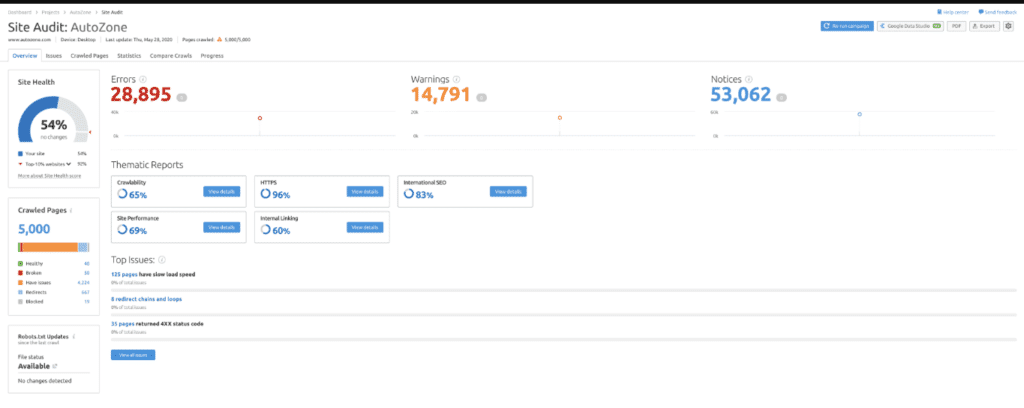
An example of a project on SEMrush site audit tool
Source – An example of a project on the SEMrush site audit tool

After getting this data, follow these tips that are mentioned below:

1. Check Your Rankings With Your Competitors

Whether it’s a new website, or you are conducting an SEO audit as part of an ongoing SEO strategy, you must understand the competition that you’re facing in your domain.

You should know the businesses in your niche you’re competing against. By using tools such as SEMrush, and Ahrefs you can undertake competitor analysis.

You can set your language, search engine, location, and device, and then add your keywords to start with competitor analysis.

Enter your keywords manually or straight from the tool that you’re using. You can even transport them from Google Analytics. Once you enter your keywords, you get a ranking of all the keywords in the tool.

Within these tools, you can right away enter the domains of your competitors and compare your keyword rankings with them. Your competitors are from your niche, and usually have a similar market hold as your business.

You can know about your competitors by conducting simple keyword searches on the search engine. As part of your SEO audit, see which businesses are ranking higher than your business on your target keywords. If you see a business appearing frequently on your target keywords and have similar market hold, reputation, trust, or credibility as your business, then that’s your competitor.  You can also similarly check for local directories, social media metrics, press reports, advertising, or through your customers to know your competitors.

Doing such market research and understanding your competitors will give a solid base to your audit.

2. Scan Duplicate Versions Of Your Site

Google should always index one version of your website. It’s an essential check you must perform. Take this for an example:

  • https:// website .com
  • http://www. website .com
  • http:// website . com
  • https:// www. website .com

Look at the 4 examples for a minute. They may look similar but are rather different. When you do a Google search, only one version of your site should appear in all the results. A slight variation means trouble. The search engines perceive these as different variations of the website. Only one version of your website should be indexed and should appear in the results.

Simply go on Google and type site: your website name.com. Have a look at this example.

SEO Audit

You can see on this example http://182.77.48.223/dev/seoindiaonline/ appears in all the results. Any discrepancy in this during an SEO audit would have meant trouble. But that's not the case and there's no variation as it should be.

While you’re doing this check also keep a tab on the number of results. You see in the above example 173 results which is the expected number. If you see a large or a lesser digit than your expectation, there might be some issues that you need to look into. A lesser number indicates Google isn’t crawling or indexing your website pages properly which means you have a technical issue on your website.

A higher number means Google is indexing content you don’t want it to index. This also indicates that you have a lot of duplicate content or poorly written content that’s getting indexed. Either way, it calls for an indexing check which must be performed as quickly as possible as these results could be lowering your site rankings on your target keywords.

3. Abide By Google Webmaster Guidelines

Google’s Webmaster Quality Guidelines can issue a manual action against your website if you violate any of its stated guidelines. Breaking any of these guidelines can cause a sharp drop in your rankings. Your whole website can become non-indexed and won’t rank.

Google Search Console keeps you aware if you’ve violated any of these guidelines. Over to the left-hand side of the menu, you should see a ‘Security & Manual Actions’ tab. Within the tab, you must locate a manual actions link.

Click on the link and No Issues Detected should appear. If you do find any issues, kindly go through this official guide to resolve your issues. Therefore, with an SEO audit issues as such can be detected and resolved.

4. Analyze Site Speed

Your site speed is a crucial factor. No one likes a lazy, slow website. Individuals like those websites that are quick with an easy-to-use interface. If a person finds the website slow to respond, they’d leave, hence decreasing your leads, sales and revenue in no time. Your bounce rate shoots up and your business faces a major setback. Bounce rate defines the percentage of visitors that enter your website and leave without interacting with your website. A bad page speed can increase your bounce rate significantly.

As a matter of fact, Google rolled out a page experience update in 2021. So, you can see website responsiveness as a crucial ranking factor. Look at the below diagram to comprehend this concept furthermore:
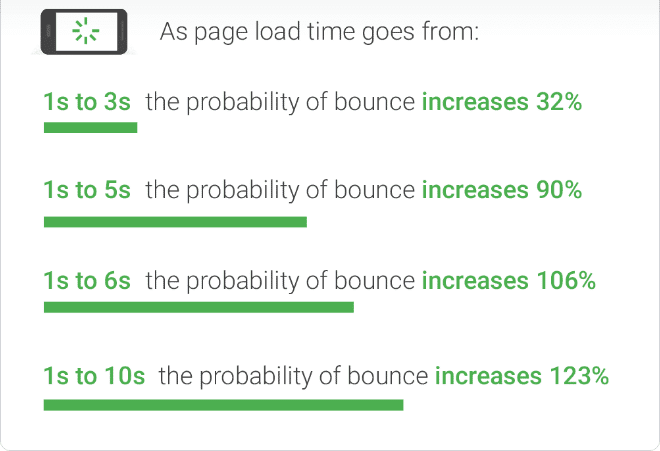
The picture shows how bounce rate increases with page load time
Source – The picture shows how bounce rate increases with page load time

You can use tools such as SEMrush, Google Analytics, to discover and understand more about the page speed on your website. These tools also give you recommendations on how you can improve page speed.

5. Get Your Website SSL Certified

During an SEO audit make sure your website is SSL certified. You can check this by entering https://www.domain.com in the browser. If your site works on the HTTPS protocol, you’re in the clear with this. However, if you are redirected to an HTTP protocol, you’ve got some work to do.

SSL certification for a website has been a ranking factor since 2014. If your website still functions on HTTP, you need to add SSL certification. You can achieve this for free from Let’s Encrypt.

6. Use Google Search Console To Understand Various Indexing Issues

Access your Google Search Console and head over to the Coverage page in the Index section. Here you can get a complete tab on the issues, and errors your website may be facing. This can include coverage errors, excluded pages, or pages that have warnings.

You need to address issues if found and fix them immediately. Determine the cause and start working on these errors immediately.

Also, keep a note of your excluded pages. These pages are not yet indexed and can include:

  • Canonicalization issues
  • Pages that are indeed no index
  • 404 or Not Found errors
  • Pages blocked by your robots.txt file
  • Redirecting pages

Go through the report and fix any major concerns, if necessary. You can learn more about these types of errors and issues here.

7. Check For Mobile Friendliness and Page Experience

Mobile-first updates have bought a major change in how Google ranks a website. Therefore, having a responsive design or a mobile-friendly website can boost your rankings in no time and should be a part of your SEO audit check. Mobile updates have been brought in by Google keeping in mind the increasing mobile usage. The better your website performs on mobile, the more it’s rewarded by Google.

2021’s Page Experience Update by Google clearly states how mobile-friendliness is an important ranking factor. Therefore, while doing an audit you have to measure the mobile-friendliness on your website.

Despite having mobile-optimized versions, or a responsive website design, websites can still experience mobile usability issues. In the Google Search Console, navigate to the Mobile Usability section in the Enhancements tab. If any issues are there, they’ll get displayed in this section. If not, you are in the clear and your site is indeed mobile-friendly and optimized for it.

Also, keep in mind that Google now takes into consideration the page experience alongside the core web vitals.

Google’s core web vitals measure the user experience through various parameters. For example, have a look at this image:
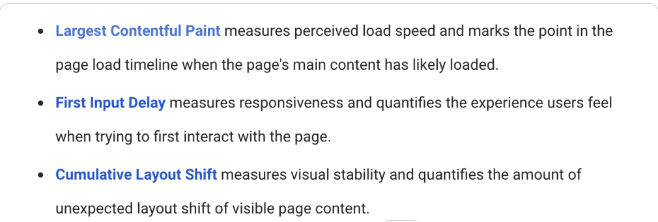
The parameters used to measure the core web vitals
Source – The parameters used to measure the core web vitals

Core web vitals are a crucial rankings factor and your SEO audit, should hence, include these parameters. You can measure these parameters in the Google Search Console itself in the ‘Enhancements’ tab. This way you can look at poor URLs on both mobile and desktop and can improve upon them, if necessary.

8. Optimize For On-Page SEO

On-page SEO parameters should also be part of your audit. During On-Page SEO, you must check the following things:

  • Image alt tags
  • Creating and making sure content is SEO optimized.
  • Optimizing title tags, meta descriptions, and heading tags.
  • Internal website linking

On-Page SEO refers to the SEO optimization that you’ll make on the pages of your website. Ahrefs, Screaming FrogMoz, and SEMrush are all great tools that can help you optimize your on-page elements. These tools can even provide you with ideas on how to optimize your On-page elements alongside indicating the issues.

9. Quick Link Fixes

Not all SEO audit components are time-consuming. There are some simple, effective techniques that you can undertake quickly. These measures include:

Fixing Broken Internal  Links

Having broken links on your website can give a poor user experience alongside displaying error 404. Not just this, but even search engines receive poor signals from your website if you have way too many broken internal links.

Simply removing or updating the wrong URL should resolve your problem. Tools such as Google Search Console, SEMrush can help you find broken internal links and help resolve them.

Repair Your Sitemap

A site’s XML sitemap specifies the pages that Google is allowed to index. With a sitemap, Google or any other search engine can find information about the content on your website and the relationship between them. With the help of tools, you can generate a sitemap for your website. Go through this link to automatically generate a sitemap for your website. You can even let your CMS like WordPress generate a basic sitemap for you. Mind you, with this method you’re more than likely to use a plugin. Therefore, creating and fixing your sitemap should be part of an SEO audit.

After creating the sitemap, you must submit your sitemap to Google. You can submit your sitemap by taking the following steps:

  • Go to Google Search Console and select your website.
  • Click on the Sitemap from the left bar.
  • Add your sitemap URL and click on submit.

If your sitemap does have any errors, you should quickly remove the incorrect pages. If your sitemap file contains a URL with the same content web pages, or are redirecting to a different page, or more, then these are not good signs. You should immediately start fixing your sitemap issues by editing your sitemap file.

Have A Look At Your Redirects

You’re having redirects? That’s good but are they doing the job intended? It’s good to check your redirects are doing as expected. Improper redirects can lead to redirect chains and loops. SEO tools can help you figure out your redirects and solve any issues if required. Also, keep in mind to always have 301 temporary redirects instead of 302 permanent redirects, unless you want it to be permanent.

10. Content Audit

Content is king and there’s no denying the fact. However, along with your content, you must check the links included in it. You need to understand not all links are good links. Your links should be from reliable sources, and anything spammy should instantly be removed.

You can again make use of SEO tools such as Ahrefs, and SEMrush, to figure out the bad links and remove them.

Checking for duplicate content should be a part of your SEO audit. Make sure to remove any duplicate content. Always keep the content fresh on your website, and duplicate copies should not exist. Similarly, also remove or improve your thin content. Thin content is content that’s of no value to the user. Your website might contain sections of content, blog, or articles, that don’t add any value to the user. You should either remove this content or improve this content to make it valuable. You can also make them no index so that Google search bots can’t access them.

You should also focus on content that has no internal linking. Your website pages should have at least one internal link. Pages that have no links or internal linking can bring your website rankings down. Get at least one quality, appropriate link to make the page more useful to the reader.

Lastly, write content that solves user intent. Any content that solves user queries is valued by Google. Your website content should provide value to the user. If you’re not ranking well, go through the content of the pages that are ranking at the top of your target keyword. You’ll have your answer.

Conclusion

An SEO audit can help you formulate an effective SEO strategy. In fact, this is usually the first step of an SEO strategy and this guides the further steps that you must take to improve your SEO rankings. You can even optimize an ongoing SEO plan with an effective audit.

Take your audit steps in the order of severity of the problem and you shall see some positive results. Take into consideration the resources and the time needed to fix these issues. If these variables are handled well, your audit and resolution should do wonders for your SEO plan. Whether it’s your first step or part of a continuous SEO plan, you should see some positive results with an SEO audit if done properly.

Best Ways SEOs Are For Using ChatGPT

A novel chatbot driven by AI can revolutionize search engine optimization. Below are some examples of its current applications. Be careful, Google. The new player has entered the field of search engines.

You’ve likely heard it before; however, this time is different.  ChatGPT (Generative Pre-trained Transformer) is a significant linguistic paradigm.

It may converse with people in a cognitive fashion utilizing artificial intelligence (AI) and databases, responding to follow-up inquiries, admitting errors, declining unsuitable inquiries, and even refuting faulty assumptions.

While not specifically a Google competition, this OpenAI chatbot transforms how it conducts research. For example, it will fundamentally change how it handles search engine optimization. In this article, we’ll examine these technologies and discuss some cutting-edge applications forward that search engine optimizers use to accomplish their tasks.

What Can You Do With ChatGPT?

The potential of machine learning and artificial intelligence in SEO and advertising is still exploring. ChatGPT can join in conversations and respond to inquiries in a way that resembles a human.

It can produce novels, poetry, essays, and even advertisements, sufficient to worry experienced writers like myself. The New York City Department of Education has already prohibited its use due to concerns about cheating because it can create precise and adequate information.

ChatGPT is intelligent enough to be utilized for writing meta descriptions and debugging codes in addition to contents. It is currently a laborious technical process for scripting, but it appears plausible to expect that it will become significantly more straightforward as the learning model expands.

It can also serve as a search helper, offering responses to inquiries in a simple and understandable format, saving users the need to browse through numerous website pages to locate the data they need.

However, it would be wise to embrace AI technology instead of being concerned about it. There are different ways you can utilize it to organize your workflow and increase the effectiveness of monotonous or repetitive jobs.

Let’s examine how modern SEO experts or SEO Companies are already utilizing ChatGPT.

Methods That SEO Pros Are Previously Pushing ChatGPT To Work

  1. Generating Content

If you don’t have a talented (and modest) writer like myself on the team, producing material might be a nuisance. Does ChatGPT carry this out for oneself? It still can, but you must avoid employing it to compose blog entries and websites.

John Mueller, the Google Search Advocate, stated unequivocally in 2022 that the search tool considers artificially intelligent information spamming a breach of the company’s standards. Even information that uses anti-detection techniques can currently be penalized by Google algorithms. When using AI, human monitoring should always use.

To securely write Content for posts to social media, email presentations, PPC webpage copy, and even advertisements, anyone can utilize ChatGPT. Also, it works well as a creative technique.

However, you should always carefully examine any dynamic content because it might contain errors. ChatGPT can assist in simplifying numerous duplicated content jobs, such as advertising versions if you use caution.

  1. Keyword Assessment And Research 

Okay, so you don’t want to run the danger of being prosecuted for using ChatGPT for content creation. However, that doesn’t indicate the quality content can’t take advantage of its strength.

Researching keywords is relatively trivial using ChatGPT. Launch the chatbots, enter a couple of your desired keywords, and request related things. ChatGPT will list relevant terms depending on its knowledge of the search results.

I conducted keyword research for a bank software company to test such a feature. Soon after, the chatbot gave me a shortlist of phrases and words that would have required me considerably longer to keep coming up with using more conventional targeted keyword methods.

Also, ReadKeywords Research For SEO

  1. Content Strategy Development

It is accurate. ChatGPT should create an overview of your information marketing plan. Although you could ask for them, it doesn’t provide detailed strategies but offers high-level strategies for information about a particular discipline.

One caution regarding using a chatbot-created content marketing strategy is the worry that your direct rivals might follow suit. As a result, you’re all writing blog content equivalent to “the advantages of AI,” “how AI SaaS may increase productivity,” etc.

  1. Improved Perception Of Research Focused

This capacity of ChatGPT to delve deeper into the search engine and see beyond the keywords to the search queries is the most intriguing SEO-related possibility.

Indeed, Google strives to accomplish it, and yes, it has improved significantly throughout the search engine’s existence, but rather to paraphrase Keiran Flanagan in a post, “Google takes your question and attempts to respond to it. The inquiry by ChatGPT frequently improves it.

Even though the beta version of this chatbot is still not online, learning capacity will enable it to gain much higher knowledge. It is of every search’s objective and occasionally even provides results the user wasn’t even aware they were searching for.

As an SEO expert, you know that your ranks will soar by modifying your data to address a query more effectively. One could achieve that with ChatGPT.

  1. Producing Excellent SEO Labels

Any copywriter will tell you that headers are among the hardest to write, especially for SEO purposes. It frequently becomes dry topics such as “How To Generate Backlinks” or another uninteresting comparison.

I requested ChatGPT to provide me with a selection of headlines for a webpage on backlinking to change things up, and it gave me ten alternatives, which were all better intriguing than the original “how to” lines.

Also, ReadAdvanced SEO Strategy For 2023

  1. Composition And Management Of Analytical Statements

Spreadsheets and reporting are the hellions of several marketers’ working existence. Businesses, however, demand information to show the impact of their work. It is where ChatGPT can transform the game. Additionally, you can find fresh ranking prospects you would have overlooked using this capability.

Imagine you have little programming skills but must create regular expressions for analytical reports. For instance, you could use specific keywords to filter reports to find more room for FAQs or even how. Anyone understanding these statements can utilize ChatGPT to interact with the chatbots to assemble a list dynamically.

Similarly, ChatGPT can help you with Google sheets or Excel if you frequently deal with them (and who’s not?). But, again, this can take a lot of the stress of developing equations and analyzing information.

AI Offers A Bold Modern World For SEO

A very remarkable application is ChatGPT. Specifically for SEO services, it’s simple just to get overtaken in the thrill of everything it delivers and what it may be able to do.

It may save you thousands of hours a year with the little sample of features mentioned here.

Even yet, there are some disadvantages. For starters, in its modern iteration, it can only use information up to the year 2021. Therefore, it cannot offer any insight into current developments.

Although it’s safe to presume that a future iteration of the chatbots will address this problem, we are still unsure how quickly the AI can pick up on new occurrences and connect them to specific other issues.

Furthermore, it is not entirely truthful and objective. Its sources can cause it to accept and repeat incorrect data, and the initial dataset it was training on could be bias-free.Last but not least, as a person who grew up seeing Terminator films, there is constantly the concern that ChatGPT may develop consciousness and enslave humans. So, I went right up to it to be cautious.

The Final Verdict

ChatGPT is excellent, and all indications are that it will continue to improve. It demonstrates the ability for the optimization of search engines to become significantly faster and more effective. We should take all precautionary measures to prevent it from being linked to the nuclear arsenal.

404 vs. Soft 404 Errors – What is and How To Fix It?

Every page that you access through your browser has a response code.  This code is the number such as 200, 301, 302 which tells you whether your request was satisfied or not. Another response code that you may encounter is 404. This means that the webpage could not be found.

While this might sound like a minor irritation, imagine yourself in this situation: You are looking for something specific on the web and every link leads to a broken page because it has a 404 status. Obviously, getting frustrated would be an understatement of what you will feel after spending hours trying to find what you are looking for only to end up with lots of “page cannot be found” messages.

To put it simply, any code that comes between 400 to 499 shows that the page didn’t load properly. In addition, the 404 code reflects that the page is being deleted, shifted, and not coming back anytime soon.  On the other hand, a 301 code tells you that the page was moved to a new location. This is something very useful if you want to avoid broken pages in the future because it saves all of the relevant information from one location and takes it to another.

What is a 404 error?

A 404 is the response that your browser sends when it cannot find a web page or resource. The “404 Not Found” error message is displayed when the webpage you are trying to reach can’t be found on the server, meaning that either the page was deleted, never existed before in the first place, has moved to another location or something went wrong while displaying it.

This means that if you have made several links between two pages and one of them happens to link to an invalid URL, all of them will not work anymore. This problem becomes significant with dynamic sites because they change their location frequently. If this occurs in static websites though, things are much more simple since they don’t move very often.

Many browsers try to give you an idea of what went wrong with a web page by showing a “Did you mean?” message under the 404 error code. This way, if you have misspelled the URL you can still get where you wanted to go, but this depends also on your server settings.

How to fix 404 errors?

The first recommendation is to make sure that your web server doesn’t show “404 Not Found” but instead returns a custom page with information aimed at your users, apologizing for the inconvenience. This way you will avoid broken links and because of that, think positively about search engine crawling too.

This may be achieved if you are using dynamic content which changes constantly or if your web pages are stored in several servers. If this isn’t the case though then there are many other ways to solve the problem: Fortunately, it is possible no matter how complex your website structure is.

The first step would be to install Apache Traffic Server so you can monitor all of the incoming requests from your users and check if any of them point to a 404 page. If that is the case then you can redirect these requests by sending them to another valid URL. This can be done automatically only on the basis of the domain name or it can be implemented as a custom script that finds out what was requested and finds an alternative for it.

Another option is to install a plugin, such as Redirection, which does exactly that: finds pages with a different status code and changes their URL accordingly so they remain functional even though they returned an error code. Even though this method creates many duplicate URLs, also called soft duplicates, these aren’t something bad since search engines understand how dynamic content works and treat those URLs as separate listings instead of just one.

Finally, it is also possible to use custom 404 pages created with one of the many WordPress 404 plugins. This option has both pros and cons: on one hand, you fix the problem once and for all by having a single plugin but on the other hand, you need to assign an administrator user rights to access that page and don’t have as much control over how it works.

Now that you know what causes 404 errors and how to avoid them, think about why they actually happen and decide which way of fixing them will best suit your needs. Don’t forget that not only do search engines dislike broken links, so do your audience! If people can’t find what they are looking for after clicking a link from your website then they won’t come back again.

Also, Read – How To Do SEO For Google Hindi News Websites?

What are soft 404 Errors?

Soft 404s are pages that return a valid HTTP response code, but not one in the 200 range – i.e., they return an answer other than HTML which matches what browsers expect from a web page. Soft 404s cause problems because while they do serve content to users and don’t look like broken pages, search engines see these as non-existent pages and don’t include them in their indexing process, which hurts crawl rate and the site’s indexing process.

How to fix soft 404s?

One way to ensure that your website doesn’t return a soft 404 is to configure your web server. So it serves as a custom page with some information about what happened and how users can navigate the website. While this method causes additional traffic, as search engines may see these custom pages as duplicates of each other, or even worse, as attempts at cloaking content from them, they are better for user experience and will encourage visitors to come back.

The other option is to not have a file with the same name as the non-existent URL but instead use paths that do lead somewhere. This way you avoid any confusion on behalf of both visitors and search engines because there is no chance for them to think that you wanted one page or another. For the time being though it’s probably best to stick with using custom pages, as these allow for more control over what you display.

Most web designers are aware of how important it is to make websites compatible across different browsers but they tend to forget about honoring the conventions set by search engines – having all links point to existing pages that are also available in HTML format, for example. If this isn’t done then search engines may not be able to crawl your website at full speed or won’t even crawl it at all – which leads to lower rankings and worse user experience.

Also, ReadHow to Drop a Pin in Google Maps on Desktop & Mobile

1: Google treats 404 and soft 404 the same

Google deals with 404 errors & soft 404 errors the same way, by not including the non-existent page in its index. Google has programs to find 404 pages and help webmasters fix them, but they won’t affect rankings.

It is possible for WordPress users to fix soft 404 errors through plugins. Custom 404 pages are also possible via plugin or custom coding.

By fixing soft 404 errors, you can avoid losing traffic & rankings because of search engine crawlers ‘not finding’ something on your site that doesn’t exist. It’s best to fix soft 404 errors with custom pages rather than redirecting links because search engines might see this as providing duplicate content which could hurt your site’s ranking or even get it penalized.

There are several disadvantages of 404 pages. Firstly, they can cause problems for users who are already looking for what you offer. For example, if the user has visited the 404 page from a search engine listing then it is likely that they have bookmarked your website in order to return at a later date. Now if your website gives them a 404 error then they will be extremely annoyed because not only have they lost their bookmark but since you didn’t give them any other information on how to get hold of the content that they were looking for, there is nothing else that they can do to find it.

Secondly, when someone gets a 404 page instead of the content that was originally promised; many users won’t take this well and decide never to visit your site again. Even worse, some people may assume that this means your website is no longer up and running – which can be harmful to your reputation.

Soft 404s are a special class of HTTP response code which means “I don’t have anything for you”. Soft 404 responses occur when a webpage does not exist on your server but the client was able to establish a connection and is expecting some kind of response back (it will either receive it or get an error). If this happens, chances are that they expected something specific; instead, they received an empty page with no content on it.

2: Keep auditing your site

For avoiding problems of 404 and soft 404 errors, ensure you perform a regular technical audit of your website.  You can visit your site with various tools that are available on the web.

Prominent search engine optimization firm, SEOmoz provides excellent Search Engine Optimization (SEO) software, known as Moz Link Explorer, to check for broken links and more importantly – the return of HTTP code 404 or status code. You can also run it on your backlink profile to find broken backlinks pointing to your web pages.

You can also check a website for 404 errors and other problems by using the Xenu Link Sleuth, which is free to use.

In order to ensure that your WordPress site does not give out any HTTP/404 errors or soft 404 errors then you should always have a valid backup of both the database and files. In addition, it’s important to test frequently – making changes to your WordPress site manually without testing them thoroughly beforehand could lead to major problems occurring on the live version of your site.

The easiest way would be to create a staging environment where you can experiment without affecting how things are currently doing on your website. This way you’ll avoid any potential losses in rankings and traffic.’ “title”: “404 vs. Soft 404 Errors:

3: Fix the thin content issue

You can eliminate the soft 404 errors by fixing the pages that have thin content.  You can do this by:

Adding more and relevant content to the pages so that the chance of them not getting indexed is reduced. Adding necessary links on these pages to pages that are already working. Ensure that there’s a good user experience throughout your site, especially for 404 errors.

If you don’t need certain pages then it’d be best to get rid of them rather than leaving them there until they start causing problems with rankings or traffic. If you’re using WordPress as your CMS then deleting a post automatically redirects it to another page, which is good because it helps you avoid losing traffic due to soft errors.’ “description”:

If some of the website pages have duplicate content, consider fixing it on priority.  You can fix duplicate content by either making the necessary changes to each version of the page or consolidating all these pages into one. You can use Google Webmaster Tools to find out which version of a particular webpage has more indexed content.

You should remember that for each of the pages, you’ll only be able to make use of them at most once per search query. Having too many irrelevant or duplicate pages with thin content is not good for your site’s rankings and thus it would make sense to consolidate all similar web pages into one page.

4: Fixing broken links improves SEO

When you fix 404s and soft 404s, the overall SEO performance of your website improves. When you fix broken links, visitors can easily find what they were searching for without any hassle.

When you fix 404 errors, Google crawlers see that the website is more responsive. Even if it’s not related to your top keywords, Google crawl may start visiting your site frequently after fixing all 404s.

When you are done fixing soft and hard 404 errors, go through every page of your website to make sure there are no more errors or warnings in 404 pages reported by Google Search Console (formerly known as Web Tools).

You can also check a website for 404 errors and other problems by using the Xenu Link Sleuth, which is free to use.

There are several advantages of fixing soft 404 errors. Firstly, it is easy to fix soft 404s compared to hard 404 errors. Secondly, search engines take into consideration your effort in correcting mistakes and reward you with good rankings for your efforts leading to high traffic from organic sources. Thirdly, users will be able to find what they search for on your site which means higher conversion rates.

Fixing soft 404 errors is an easy process that can be done by anyone. You just have to filter through the search results to manually find out where the soft 404 errors are. Then you need to change your internal linking structure so that URLs with 404 errors do not appear in search results anymore.

5: Using Screaming Frog tool

Screaming Frog is a useful SEO tool that helps you find pages with thin content. It crawls pages, extracts all the necessary information from a website, and allows you to filter through the data so that you can find errors easily.

In this tool, you can select the near duplicate option and then start the scanning of your website. You can scan for these pages and import all of them in an excel file.  You can then use the list to find out the pages that have thin content.

You also need to check your website’s code so that all links are in place and you don’t have broken links. You should be looking for any instance of a 404 or 410 page being used as a response page, in your HTTP headers or anywhere else on your site (unless you deliberately choose to show these errors). The link structure of every website is complex because the number of pages usually exceeds.

Along with this, also ensure there is no technical issue with the website.  After fixing 404 errors make sure there are no more outgoing links to pages that do not exist.

Ensure the Google bot is able to crawl and index the pages that you’ve fixed.  If you have a WordPress site then the Yoast SEO plugin can help. It shows you all the incoming and outgoing links on your website and also warns if there is any broken link.

Wrapping up!

Both 404 and soft 404-page errors are harmful to your website’s SEO and overall user experience. Thus, always ensure there are no such errors and you’ve fixed them for better website indexability. If you don’t have an in-house technical SEO team, then it’s better to hire professionals and let them fix 404 and soft 404 errors. As search engines focus more on the overall user experience, it’s better to fix these errors and ensure an interactive user experience.

SEO India Online Typically replies within an hour
👋 Hi! Want to know more about SEO India Online or get a free AI SEO audit? Ask us anything, or start a chat with our team on WhatsApp.
Start on WhatsApp
Limited time

Free AI SEO Audit

Claim your free audit of Google & AI platform visibility before this offer window closes.

20Min
00Sec
Claim My Free Audit